Is My Dash Cam Always Recording or Does It Ever Stop
Is My Dash Cam Always Recording? The short answer is: it depends on your settings and power source. Most dash cams use loop recording to capture footage continuously while you drive, but they may stop when the engine turns off — unless you have parking mode or a hardwire kit installed. Understanding how your dash camera works helps you protect your vehicle and capture important events on the road.
Is My Dash Cam Always Recording or Does It Ever Stop? That is a question a lot of car owners ask. You buy a dash cam to protect yourself on the road. But what happens when you park your car? Does it keep recording? The truth is, it depends on several factors. Your camera model, your settings, and your power source all play a role. In this guide, we break everything down so you know exactly what your dash cam is doing at all times.
Whether you drive a sedan or a truck, a dash cam is one of the best investments you can make. It captures video footage of your daily commute, road trips, and unexpected incidents. But many drivers assume their camera is always on. That is not always true. Let us explore how dash cams work, what settings affect recording, and how you can make sure your camera is doing its job.
Key Takeaways
- Dash cams record continuously while driving: Most cameras use loop recording to capture non-stop footage as long as they are powered on.
- They may stop when the car is off: Without parking mode or a hardwire kit, your dash cam typically shuts down when the engine turns off.
- Parking mode keeps your camera active: Motion detection and G-sensor features allow the camera to record even when your car is parked.
- Loop recording prevents memory card issues: Old footage is automatically overwritten, so you never run out of storage space.
- Settings matter a lot: Adjusting resolution, loop time, and parking mode settings changes how your dash cam behaves.
- Overheating can stop recording: High temperatures may cause your camera to shut down temporarily for protection.
- Regular maintenance keeps it running: Cleaning the lens and checking the memory card ensures reliable footage capture.
📑 Table of Contents
- How Does a Dash Cam Work?
- Is My Dash Cam Always Recording While Driving?
- What Is Loop Recording and Why Does It Matter?
- Parking Mode: Recording When You Are Not There
- Common Dash Cam Settings You Should Know
- Tips to Make Sure Your Dash Cam Works Properly
- Common Mistakes That Stop Your Dash Cam From Recording
- Frequently Asked Questions
- Conclusion
How Does a Dash Cam Work?
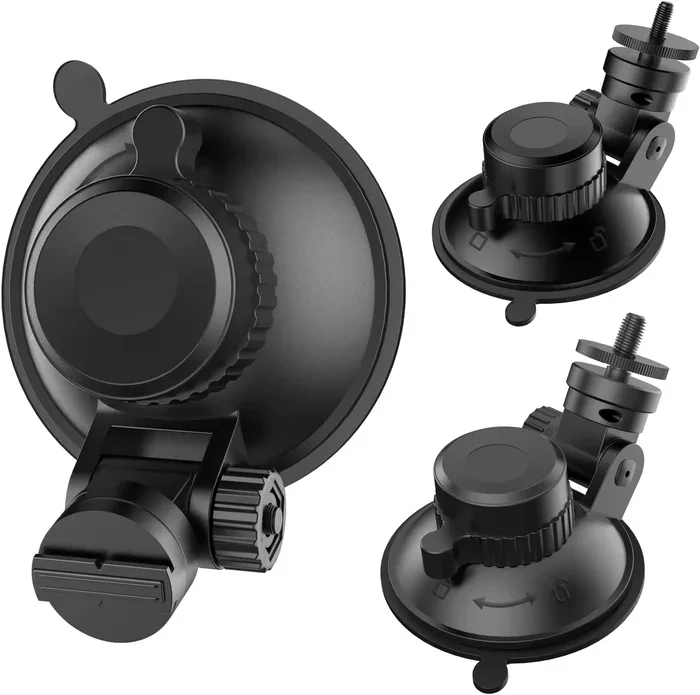
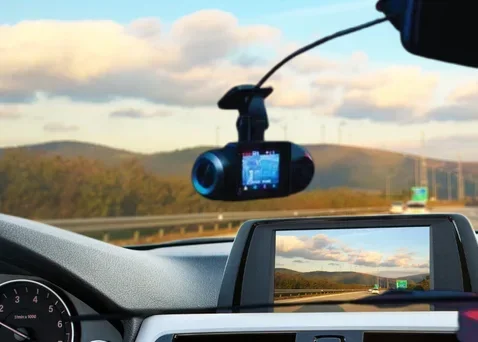
Before we answer the big question, let us understand the basics. A dash cam is a small camera mounted on your windshield. It records video while you drive. Most models also record audio. The camera connects to your car’s power supply through the cigarette lighter or a hardwired connection. When you turn the key, the dash cam turns on.
The camera uses a memory card to store footage. This is usually a microSD card. When the card fills up, the camera starts overwriting the oldest files. This process is called loop recording. It means your dash cam never stops capturing new video, as long as it has power and storage space.
The Role of the Memory Card
Your memory card is the brain of your dash cam’s storage system. Without it, the camera has nowhere to save video footage. Most dash cams work best with a Class 10 or U3 rated microSD card. These cards handle the constant read and write speeds needed for smooth recording. A slow memory card can cause the camera to freeze or stop recording entirely.
Always format your memory card before first use. This ensures the file system is compatible with your dash cam. Replace your card every one to two years for best performance. A worn-out card can corrupt your footage at the worst possible moment.
Power Supply and Connectivity
Your dash cam needs a constant power source to keep recording. Most cameras plug into the car’s 12V socket. When you turn off the engine, the camera loses power and stops recording. Some advanced dash cams connect directly to the car’s fuse box. This setup keeps the camera running even when the ignition is off.
USB-powered dash cams are also common. These plug into a USB port in your car. They work well, but they also stop recording when you turn off the engine. If you want continuous recording, you need a different power setup.
Is My Dash Cam Always Recording While Driving?
The answer to this question is mostly yes. When your dash cam is powered on and has a memory card inserted, it records continuously. This is the default behavior for most dash cameras on the market today. As long as the engine is running and the camera is connected to power, it keeps capturing video.
However, there are exceptions. Some dash cams have a built-in battery or a supercapacitor. These allow the camera to keep recording for a short time after the engine turns off. But this is not the same as continuous recording. The camera will eventually stop once the internal power runs out.
What Happens When You Turn Off the Engine?
In most standard setups, your dash cam stops the moment you turn off the ignition. The camera loses power and the recording stops. This means anything that happens while your car is parked is not captured. For many drivers, this is a big concern. What if someone scratches your car in the parking lot? What if a branch falls on your windshield overnight?
This is exactly why parking mode exists. It is a feature designed to keep your dash cam active even when the car is not running. But it requires a special setup, which we will cover in detail below.
Continuous Recording vs. Event-Only Recording
Some dash cams allow you to choose between continuous recording and event-only recording. Continuous recording means the camera never stops while powered on. Event-only recording means the camera stays in standby mode and only starts recording when it detects motion or a sudden impact.
Continuous recording gives you full coverage of your drive. Event-only recording saves battery and storage space. The right choice depends on your needs. If you want complete protection, continuous recording is the way to go.
What Is Loop Recording and Why Does It Matter?
Loop recording is one of the most important features of any dash cam. Without it, your memory card would fill up quickly. Once full, the camera would stop recording entirely. Loop recording solves this problem by automatically overwriting the oldest footage with new video.
This means your dash cam always has space to capture new events. You do not need to manually delete old files every day. The camera handles everything in the background. This is why most modern dash cams come with loop recording enabled by default.
How Loop Recording Protects Your Footage
Here is how loop recording works in practice. Let us say your memory card holds 32GB of data. At 1080p resolution, that is roughly 4 to 6 hours of continuous video. Once the card is full, the dash cam deletes the oldest file and records over it. This cycle repeats endlessly.
But what about important footage? Most dash cams have an emergency save feature. When the G-sensor detects a sudden impact, the camera locks that file. Locked files are not overwritten during the loop recording cycle. This means your critical video evidence stays safe even when the card is full.
Adjusting Loop Recording Settings
You can usually adjust the loop recording time in your dash cam settings. Common options include 1 minute, 3 minutes, 5 minutes, and 10 minute segments. Shorter segments mean smaller file sizes. This makes it easier to find specific moments in your footage. Longer segments use more storage but are better for capturing longer events.
If you frequently drive long trips, a longer loop time works well. If you want to save storage space, shorter segments are better. Experiment with different settings to find what works for your driving habits.
Parking Mode: Recording When You Are Not There
Parking mode is the feature that answers the question, “Is My Dash Cam Always Recording or Does It Ever Stop?” when your car is parked. This mode allows your dash cam to keep recording even after the engine turns off. It uses minimal power and relies on motion detection or a G-sensor to start recording.
Not all dash cams have parking mode. Entry-level models often skip this feature. If you want full-time protection, make sure your dash cam includes parking mode before you buy. It is one of the most valuable features for any driver.
How Parking Mode Works
When parking mode is activated, the dash camera enters a low-power standby state. The screen turns off to save energy. The camera constantly monitors for motion or impacts. If someone walks in front of your car, the motion sensor triggers the camera to start recording. If someone bumps your car, the G-sensor locks the footage immediately.
Some dash cams also offer time-lapse recording in parking mode. This captures a frame every few seconds instead of full video. It uses much less storage and battery. It is a great option if you park your car for long periods, like at the airport or overnight.
Hardwire Kits and Battery Backup
To use parking mode, you need a way to power the dash cam when the engine is off. There are two main options. The first is a hardwire kit. This connects the dash cam directly to your car’s fuse box. It provides a constant low-voltage power supply that does not drain your car battery.
The second option is a battery backup. Some dash cams come with built-in rechargeable batteries or supercapacitors. These provide enough power to keep recording in parking mode for a limited time. Supercapacitors are more reliable in hot weather. They do not suffer from the same degradation as lithium batteries.
If you live in a hot climate, a hardwire kit with a voltage monitor is the best choice. It ensures your dash cam keeps running without risking damage to your car battery. Many dash cam kits include this setup out of the box.
Common Dash Cam Settings You Should Know
Your dash cam is only as good as its settings. If you do not configure them properly, you might miss important footage. Here are the most important settings to understand and adjust.
Resolution and Frame Rate
Resolution determines how clear your video footage looks. Most dash cams offer 1080p, 2K, or 4K options. Higher resolution means sharper images. It also means larger file sizes. A 4K dash cam fills up a memory card much faster than a 1080p model.
Frame rate affects how smooth the video looks. Standard frame rates are 30fps and 60fps. A 60fps camera captures twice as many frames per second. This makes the footage smoother, especially when recording fast-moving traffic. For most drivers, 1080p at 30fps is more than enough.
Motion Detection Sensitivity
In parking mode, your dash cam relies on motion detection to start recording. You can usually adjust the sensitivity level. High sensitivity means the camera triggers more easily. This is good for capturing small movements, like a person walking by. Low sensitivity means the camera only triggers for larger movements, like a car hitting yours.
Setting the sensitivity too high can cause false triggers. Your camera might record shadows, rain, or insects. This wastes storage space and battery life. Find the right balance for your parking environment.
G-Sensor and Emergency Lock
The G-sensor measures sudden changes in movement. When your car is involved in a collision, the G-sensor detects the impact. It automatically locks the current video file. This prevents the footage from being overwritten during loop recording.
You can usually adjust the G-sensor sensitivity. A higher sensitivity setting locks footage for smaller bumps. A lower setting only locks files during serious impacts. Choose a setting that matches your driving environment. If you drive on rough roads, a lower sensitivity setting prevents unnecessary file locks.
Tips to Make Sure Your Dash Cam Works Properly
A dash cam is only useful if it works reliably. Here are some practical tips to keep your camera running smoothly and ensure it captures everything it should.
Keep the Lens Clean
Your dash cam lens gets dirty over time. Dust, rain, and fingerprints can blur your footage. Wipe the lens with a microfiber cloth every week or two. This takes only a few seconds but makes a big difference in video quality.
Avoid using harsh chemicals to clean the lens. A simple damp cloth works best. If your dash cam has a built-in lens cover, use it when parking in dusty areas.
Check the Memory Card Regularly
A faulty memory card can cause your dash cam to stop recording unexpectedly. Check your card every few months. Look for signs of corruption, like missing files or error messages. Format the card in your dash cam regularly to keep it running smoothly.
Do not use a memory card that is too large. Most dash cams work best with cards between 32GB and 128GB. Cards larger than 256GB may not be compatible with some models.
Position the Camera Correctly
Where you mount your dash cam matters. The best position is behind the rearview mirror, near the top of the windshield. This gives the camera a clear view of the road. It also keeps the camera out of your line of sight.
Avoid placing the camera directly behind the rearview mirror if it blocks your view. Make sure the mount is secure. A loose dash cam vibrates while driving, which causes blurry footage.
Update the Firmware
Dash cam manufacturers release firmware updates regularly. These updates fix bugs and improve performance. Check for updates every few months. Most dash cams have a companion app that makes this process easy.
An outdated firmware version can cause recording issues. It might also prevent your parking mode from working correctly. Keeping your software up to date ensures your dash cam performs at its best.
Watch for Overheating
Dash cams generate heat during continuous recording. In hot weather, this can cause the camera to overheat. When a dash cam overheats, it may shut down automatically to protect its internal components.
To prevent overheating, park in the shade when possible. Some dash cams come with built-in heat sinks or ventilation design. If your camera frequently shuts down in the summer, consider upgrading to a model with better thermal management.
Common Mistakes That Stop Your Dash Cam From Recording
Even the best dash cam can fail to record if you make these common mistakes. Avoiding them ensures your camera captures everything you need.
Forgetting to insert or format the memory card. Without a memory card, your dash cam has nowhere to save footage. Always check that the card is properly inserted before you drive.
Using a low-quality memory card. Cheap cards fail quickly under the constant read and write demands of dash cam recording. Invest in a reliable, high-speed card from a trusted brand.
Not enabling parking mode. If you want your dash cam to record when your car is parked, you must turn on parking mode in the settings. It does not work automatically on all models.
Ignoring firmware updates. Outdated software can cause bugs that prevent recording. Check for updates regularly.
Letting the lens get dirty. A dirty lens produces blurry footage that may be useless in an accident. Clean it often.
Using the wrong power source. If your dash cam is not getting consistent power, it will stop recording. Make sure your cable is secure and your car’s power outlet is working.
Frequently Asked Questions
Do dash cams record all the time?
Most dash cams record continuously while powered on. They use loop recording to keep capturing new footage without stopping. However, they typically stop recording when the engine turns off unless parking mode is enabled.
Can a dash cam drain my car battery?
Yes, if left running for long periods without the engine on. A hardwire kit with a voltage monitor prevents battery drain. It cuts power to the dash cam when your car battery reaches a low voltage level.
What happens when the memory card is full?
The dash cam automatically overwrites the oldest footage with new video. This is called loop recording. Important files locked by the G-sensor during an impact are never overwritten.
Does parking mode use a lot of battery?
No, parking mode uses very little power. Modern dash cams are designed to run in standby for days or even weeks. A hardwire kit makes parking mode safe for your car battery.
Can I turn off continuous recording?
Yes, most dash cams let you switch between continuous recording and event-only recording. Event-only mode saves storage space and battery life by recording only when motion or impact is detected.
How long does a dash cam record before looping?
This depends on your memory card size and video quality settings. A 32GB card at 1080p records about 4 to 6 hours before looping begins. Larger cards and lower resolutions extend recording time.
Conclusion
So, is My Dash Cam Always Recording or Does It Ever Stop? The answer depends on your setup. While driving, most dash cams record continuously using loop recording. They never stop as long as they have power and storage. When parked, the camera usually stops unless you have parking mode or a hardwire kit installed.
Understanding how your dash cam works gives you peace of mind. You know exactly what to expect and how to configure your camera for the best protection. Take a few minutes to check your settings today. Make sure your memory card is working. Enable parking mode if you want coverage when your car is parked. Clean the lens and update the firmware.
Your dash cam is one of the most important safety tools in your car. It captures the truth when accidents happen. It protects you from false claims. It gives you proof when someone damages your vehicle. Treat it well, and it will take care of you. Now you know exactly what your dash cam is doing at all times. Drive safe and stay protected.