Does a 2012 Nissan Altima Have Bluetooth Connectivity
The 2012 Nissan Altima offers Bluetooth connectivity on most trim levels, giving drivers hands-free calling and wireless audio streaming. Whether you have the base model or a higher trim, this car Bluetooth system is a standard convenience feature that makes driving safer and more connected.
If you own a 2012 Nissan Altima or are thinking about buying one, you might be wondering about Bluetooth connectivity. This is one of those features that just makes life easier. You can take calls without touching your phone, stream music wirelessly, and stay connected on the road. But does the 2012 Altima actually come with it?
The short answer is yes. Most 2012 Nissan Altima models include factory Bluetooth as a standard feature. However, the exact capabilities depend on your trim level and the specific options your car was built with. In this guide, we will walk you through everything you need to know about Bluetooth on the 2012 Altima. From pairing your phone to troubleshooting common problems, we have you covered.
Let us dive right in and explore how car Bluetooth technology works in this popular sedan. Whether you are a tech-savvy driver or someone who just wants to make and receive calls safely, this article will give you the answers you need.
Key Takeaways
- Most 2012 Altima trims include factory Bluetooth as a standard feature, so you likely already have it.
- Bluetooth pairing is straightforward and takes less than a minute once you know the steps.
- Hands-free calling and audio streaming are the two core features of the system.
- Common issues like static or failed pairing usually have simple fixes you can do at home.
- The 2012 Altima Bluetooth system compares well to other cars from the same year, like the 2012 Honda Civic in terms of connectivity features.
- An auxiliary input serves as a backup if Bluetooth isn’t available on your specific trim.
- Regular car maintenance like a tune-up can help keep your electronics running smoothly.
📑 Table of Contents
- What Bluetooth Connectivity Means on the 2012 Nissan Altima
- How To Check If Your 2012 Altima Has Bluetooth
- Features You Get With Bluetooth on the 2012 Altima
- How To Pair Your Phone With the 2012 Altima Bluetooth
- Common Bluetooth Problems on the 2012 Altima and How To Fix Them
- Bluetooth vs. Other Connectivity Options in the 2012 Altima
- Maintaining Your 2012 Altima Bluetooth System
- Final Thoughts on the 2012 Nissan Altima Bluetooth
What Bluetooth Connectivity Means on the 2012 Nissan Altima
When we talk about Bluetooth connectivity in a car, we mean the ability to wirelessly connect your phone to the vehicle’s infotainment system. This connection opens up a few key features that make driving more convenient and safer.
Hands-Free Calling
The biggest benefit of Bluetooth hands-free calling is safety. You can answer and make calls without ever touching your phone. This keeps your hands on the wheel and your eyes on the road. The 2012 Altima supports this feature through the car’s built-in microphone and speakers. Your voice comes through the stereo system, and the other person hears you clearly through the car’s audio setup.
Wireless Audio Streaming
Bluetooth audio streaming lets you play music, podcasts, and other audio from your phone through the car’s speakers. You do not need any cables or auxiliary cords. This is a huge upgrade from older cars where you had to find a working cassette adapter or FM transmitter. With wireless streaming, your car entertainment system feels modern and easy to use.
Phonebook Sync
Some 2012 Nissan Altima models can sync your phone’s contact list with the car’s system. This means you can browse names on the dashboard screen and make calls directly from the infotainment display. It is a small feature, but it adds a lot of convenience when you are on the go.
How To Check If Your 2012 Altima Has Bluetooth
Not every 2012 Altima trim comes with the same features. Here is how you can confirm whether your specific car has Bluetooth connectivity.
Check the Infotainment Screen
Look at your car’s audio or infotainment display. If you see a Bluetooth icon or a menu option that says “Bluetooth Settings” or “Phone,” your car has the feature. The 2012 Nissan Altima models with the standard audio system and higher trims like the SL usually include Bluetooth. You can also check your original window sticker or vehicle owner’s manual for the exact features listed.
Look for the Bluetooth Button
On the center console or steering wheel, look for a button with the Bluetooth symbol. It looks like a capital “B” made of curved lines. If your car has this button, it was designed with wireless connectivity in mind. Pressing it will either start the pairing process or bring up the Bluetooth menu on your screen.
Compare With Other 2012 Models
The 2012 Nissan Altima was competitive in its class when it came to standard features. For comparison, the 2012 Honda Civic also offered Bluetooth on many trim levels during the same era. Both cars made Bluetooth a standard convenience feature rather than a luxury add-on. So if you are coming from another 2012 model, the experience will feel familiar.
Features You Get With Bluetooth on the 2012 Altima
The 2012 Nissan Altima Bluetooth system offers several useful features that make daily driving more enjoyable. Here is a breakdown of what you can expect.
Core Features
- Hands-free calling with built-in microphone and speaker integration.
- Wireless audio streaming for music and podcasts from your phone.
- Phonebook synchronization on supported devices.
- Last phone connection memory so the car reconnects to your most recent device.
- Multiple phone pairing so more than one person can connect their device.
What You Will Not Get
The 2012 Altima Bluetooth system is functional but not cutting-edge by today’s standards. You will not find touch screen controls for phone calls or advanced voice recognition. The system is designed for basic hands-free calling and audio streaming. If you want features like Apple CarPlay or Android Auto, those did not exist in 2012 and would require an aftermarket upgrade.
How It Compares to Modern Bluetooth Systems
Today’s cars offer much more advanced vehicle connectivity than what was available in 2012. Modern systems support high-quality audio codecs, voice assistants, and seamless smartphone integration. The 2012 Altima Bluetooth system works well for its era. It may feel basic compared to a 2024 car, but it still gets the job done reliably.
How To Pair Your Phone With the 2012 Altima Bluetooth
Pairing your phone with the 2012 Nissan Altima Bluetooth system is simple. Follow these steps and you will be connected in just a few minutes.
Step-by-Step Pairing Guide
- Turn on your car and make sure the ignition is in the ON position. You do not need to start the engine, but the electrical system must be active.
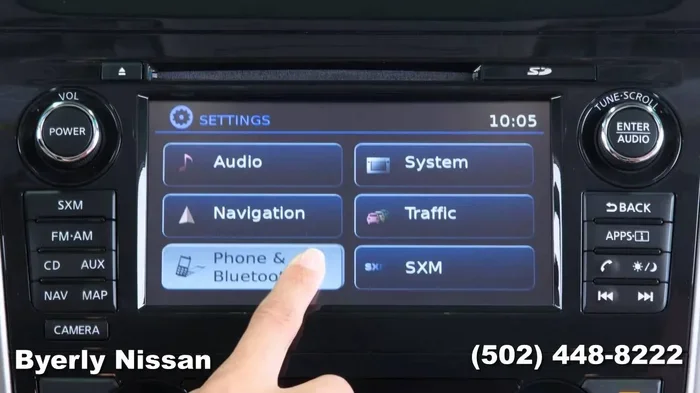
- Press the Bluetooth button on the center console or steering wheel. If your car does not have a dedicated button, go to the audio or infotainment menu and select “Bluetooth Settings.”
- Select “Add New Device” or “Pair New Phone” from the on-screen menu. The car’s system will now be discoverable.
- Go to your phone’s Bluetooth settings and turn Bluetooth on. Wait for your phone to detect the car’s system. It should appear as “Nissan Bluetooth” or something similar.
- Select the car’s name from your phone’s list of available devices.
- Enter the PIN if prompted. The 2012 Altima typically uses a default PIN like “0000” or “1234.” Check your owner’s manual if the default does not work.
- Confirm the pairing on both your phone and the car’s display. You should hear a confirmation tone and see a connected status on screen.
Quick Tips for a Smooth Pairing
- Make sure your phone’s Bluetooth is turned on and set to visible or discoverable mode.
- Keep your phone within a few feet of the car’s infotainment system during pairing.
- If the first attempt fails, turn Bluetooth off and back on on both devices, then try again.
- Delete old pairings from your phone if you have connected to many devices before. This frees up memory and reduces connection conflicts.
Common Bluetooth Problems on the 2012 Altima and How To Fix Them
Like any car Bluetooth system, the one in the 2012 Nissan Altima can sometimes act up. Here are the most common issues and how to solve them.
Bluetooth Will Not Connect
If your phone and car will not pair, the first thing to do is restart both devices. Turn off the car, wait 30 seconds, and turn it back on. Do the same with your phone. This clears temporary glitches and often solves the problem. You should also check that your phone is not already connected to another device, as this can cause conflicts.
Poor Audio Quality or Static
Static or crackling during Bluetooth audio streaming can be frustrating. This is usually caused by interference from other wireless devices or a weak signal. Try moving your phone closer to the car’s antenna area, which is typically near the rearview mirror. You should also check if other wireless devices in the car, like tablets or portable speakers, are causing interference.
Phone Connects But Audio Does Not Stream
Sometimes the Bluetooth connection works for calls but not for music. This happens when the audio profile is not set correctly on your phone. Go to your phone’s Bluetooth settings, find the car’s connection, and make sure “Media Audio” or “Audio Streaming” is turned on. The car audio system should then receive the music signal.
Car Does Not Recognize the Phone After a Software Update
If you recently updated your phone’s operating system, it may not connect properly to the 2012 Altima. This is because the car’s Bluetooth module may not support the newest protocols. The fix is to delete the car from your phone’s Bluetooth list and pair it again from scratch.
When To Seek Professional Help
If none of the above fixes work, the issue might be with the car’s Bluetooth module itself. In this case, it is worth visiting a Nissan dealer or qualified mechanic. They can run diagnostics and determine if the module needs to be replaced or reprogrammed. This is rare but does happen with older vehicles.
Bluetooth vs. Other Connectivity Options in the 2012 Altima
While Bluetooth is the most convenient wireless option, the 2012 Nissan Altima also offers other ways to connect your devices. Here is how they compare.
Bluetooth vs. Auxiliary Input
The auxiliary input (AUX port) uses a cable to connect your phone directly to the car’s audio system. It provides a stable connection with no static, but it requires a cable and takes up your phone’s charging port. Bluetooth is wireless and more convenient, but it can suffer from interference or lower audio quality in some cases.
Bluetooth vs. USB Connection
A USB connection charges your phone while playing music through the car’s system. It also allows you to control your phone’s music library through the car’s display. However, not all 2012 Altima models come with a USB port for audio. Bluetooth wins on convenience since it requires no cables at all.
Which Option Is Best?
For most drivers, Bluetooth connectivity is the best option. It handles both calls and music without any wires. If you notice audio quality issues or need to charge your phone while driving, a USB connection is a great backup. The AUX input works well as a fallback when Bluetooth is not available or not working properly.
Maintaining Your 2012 Altima Bluetooth System
Taking care of your car’s Bluetooth system is easy and helps it last longer. Here are a few simple tips to keep everything running smoothly.
- Keep your infotainment system updated if firmware updates are available from Nissan.
- Delete old pairings regularly to keep the system running fast and responsive.
- Avoid leaving your phone connected to the car when it is off for long periods, as this can drain your phone battery.
- Clean the Bluetooth button and infotainment screen gently with a soft cloth to prevent dust buildup that can affect responsiveness.
Regular car maintenance goes a long way in keeping all your electronics working properly. While Bluetooth is not something that needs physical maintenance like oil changes or tire rotations, treating your car’s electrical system well will help everything run better. If you want to learn more about keeping your car in top shape, check out how long a full tank of gas lasts or what to do when the wrench light comes on.
Final Thoughts on the 2012 Nissan Altima Bluetooth
The 2012 Nissan Altima delivers a solid Bluetooth connectivity experience for its era. It offers hands-free calling, wireless audio streaming, and phonebook sync on most trim levels. The pairing process is simple, and the system works reliably for everyday driving needs.
If you are comparing this car to others from 2012, the Altima holds its own. The Bluetooth system is not the most advanced available today, but it was a welcome standard feature back then. It made the 2012 Altima a smart choice for drivers who wanted to stay connected without dealing with wires and cables.
Whether you use it for quick calls during your commute or to stream your favorite playlist on road trips, the 2012 Nissan Altima Bluetooth system gets the job done. If you run into any issues, the troubleshooting tips in this guide should help you get back up and running quickly.
Enjoy your drive and stay connected safely on the road with your 2012 Altima and its reliable Bluetooth connectivity.
Frequently Asked Questions
Does every 2012 Nissan Altima trim come with Bluetooth?
Most trims of the 2012 Nissan Altima include factory Bluetooth as a standard feature. However, the base S trim may have limited connectivity options compared to higher trims like the SL. Check your owner’s manual or the original window sticker to confirm your specific car’s features.
Can I connect more than one phone to the 2012 Altima Bluetooth system?
Yes, the 2012 Altima supports multiple phone pairings. This means you and a passenger can each connect your own device. The car remembers the last connected phone and can switch between paired devices easily.
Why does my Bluetooth keep disconnecting from the 2012 Altima?
Frequent disconnections are usually caused by interference from other wireless devices or a low phone battery. Try moving your phone closer to the infotainment system and turning off other wireless devices in the car. If the problem persists, delete and re-pair the connection.
Can I use Bluetooth for navigation apps while driving the 2012 Altima?
Yes, you can run navigation apps on your phone and hear directions through the car’s speakers via Bluetooth audio streaming. However, the 2012 Altima does not support screen mirroring, so you will need to keep your phone mounted and use the app directly on your device.
Is the 2012 Altima Bluetooth system compatible with all phones?
The 2012 Nissan Altima Bluetooth system works with virtually all smartphones, both Android and iPhone. As long as your phone supports Bluetooth hands-free profile (HFP) and Advanced Audio Distribution Profile (A2DP), it should connect without issues.
Can I upgrade the Bluetooth system in my 2012 Altima?
Yes, you can install an aftermarket Bluetooth receiver or an upgraded infotainment unit. Many modern receivers offer better audio quality, voice control, and even smartphone integration features that were not available when the car was new. A qualified mechanic or car audio shop can help with installation.