Do All Toyotas Have Remote Start Apps You Can Use Now
Not all Toyotas come with a built-in remote start app, but many newer models do. You can use Toyota’s Remote Connect service on compatible vehicles like the 2025 Camry and RAV4. Older models may need a dealer-installed kit or a third-party solution to unlock phone-based engine starting.
You grab your coffee, slide into the driver’s seat, and tap your phone. The engine turns over, the seats warm up, and the cabin is just right before you even turn the key. That is the promise of remote start apps for Toyota owners. But the big question remains: do all Toyotas have remote start apps you can use right now? The short answer is no, but the full story is much more interesting.
Many people assume every Toyota comes with a smartphone app that starts the engine. In reality, the feature depends on the model year, trim level, and whether the vehicle has the right hardware. If you own a 2025 Camry or a recent RAV4, you are likely in luck. If you drive an older model, you still have options. This guide breaks down everything you need to know about Toyota remote start apps, from supported vehicles to setup steps and common mistakes.
We will walk you through which Toyotas support the app, how to add the feature if your car does not have it, and what to watch out for. By the end, you will know exactly whether your Toyota can be started with a phone. Let us get into it.
Key Takeaways
- Not universal: Only Toyotas equipped with the Remote Connect system have a native remote start app.
- Model matters: The 2025 Camry, RAV4, and newer Tundra typically support the app out of the box.
- Add-on options exist: You can add remote start to older Toyotas through a dealer or aftermarket kit.
- Phone start is real: You can start your RAV4 with your phone using the Toyota app, as detailed in our guide.
- Subscription required: Remote Connect usually needs an active plan after the free trial.
- Reliability holds up: Even high-mileage Toyotas keep the app working well, as noted in our reliability piece.
📑 Table of Contents
What Are Toyota Remote Start Apps?
A remote start app is a smartphone application that lets you start your car’s engine from a distance. You use the app to send a signal to your vehicle, which then fires up the engine, activates the climate control, and sometimes even unlocks the doors. The whole process happens over a cellular network or Wi-Fi, so you do not need to be within Bluetooth range.
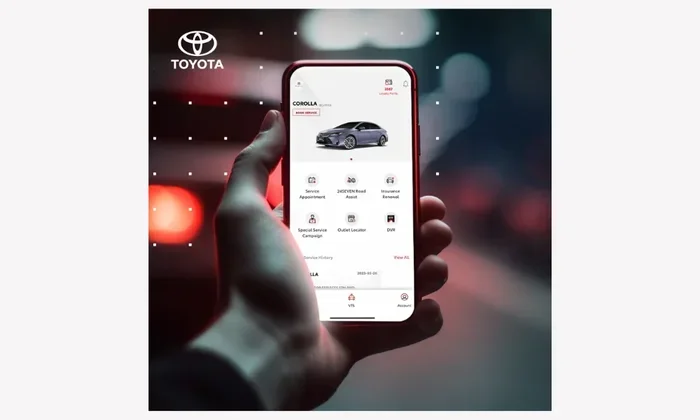
Toyota’s official system is called Remote Connect. It is part of the Toyota Connected Services package. The app works with Toyota’s keyless entry system and uses the vehicle’s built-in modem to communicate. Once you pair your phone with the car, you can control many functions from the app. These include remote engine start, lock and unlock, horn and lights activation, and vehicle location tracking.
How Remote Connect Works
When you press the remote start button in the app, a secure signal goes to Toyota’s cloud servers. The servers then send a command to your car’s onboard computer. The engine starts, and the climate control adjusts to your last settings. You can set a timer so the car turns off after a set period. This is great for warming up the car on a cold morning or cooling it down in summer.
The system relies on a telematics control unit inside the vehicle. Not all Toyotas have this unit. That is why the app does not work on every model. The unit handles the communication between the car and the cloud. Without it, the app cannot send start commands. This is the main reason some Toyotas lack the feature.
Which Toyota Models Have Remote Start Apps?
Toyota has been rolling out Remote Connect across its lineup, but coverage is not uniform. Newer models from 2021 onward are more likely to support the app. Older models may not have the hardware needed. Here is a breakdown of what to expect.
Models That Support the App Out of the Box
Most Toyotas sold in the last few years come with the Remote Connect system. The following models typically include the feature:
- 2025 Camry: The latest Camry supports full remote start via the app. You can even use it to pre-condition the cabin. Check our detailed guide on Can You Remote Start A 2025 Camry for specific steps.
- RAV4 (2021 and newer): The RAV4 works with the Toyota app. You can start the engine, lock the doors, and track the vehicle. If you want to start your RAV4 directly from your phone, see our article on Can I Start My Rav4 With My Phone.
- Tundra (2022+): The new Tundra includes Remote Connect as a standard or available feature depending on the trim.
- Highlander and Sienna: These family haulers often come with the system, especially in higher trims.
- 4Runner and Tacoma (newer generations): Recent models support the app, but older generations may not.
Models That May Not Support It
Older Toyotas, particularly those from 2019 and earlier, often lack the telematics unit. Some base trims also skip the feature even in newer years. If your Toyota does not have a Connected Services badge or a modem, the app will not work. You can check your owner’s manual or ask a dealer to confirm.
It is also worth noting that even if your model supports the app, you need an active Toyota Remote Connect subscription. The first year is usually free, but after that, you must pay an annual fee to keep the features. Without the subscription, the app will lock you out of remote start.
How to Set Up and Use the App
Setting up the Toyota remote start app is straightforward if your vehicle is compatible. Here is the step-by-step process.
- Download the Toyota app: Find the official Toyota app in the Apple App Store or Google Play Store. The app is called “Toyota” or “Toyota Remote Connect” depending on your region.
- Create an account: Use your email address and create a password. You will need your Toyota Vehicle Identification Number (VIN) and the vehicle’s 4G LTE modem details.
- Pair the vehicle: Follow the in-app prompts to link your phone to the car. The car must be in park and the engine off. The app will search for the vehicle’s modem and register it.
- Activate Remote Connect: If your car has the hardware but not the service, you will need to activate the subscription. You can do this through the app or by contacting a Toyota dealer.
- Start the engine: Once paired and activated, open the app, select your vehicle, and tap the remote start icon. The engine should fire up within a few seconds.
Quick Tips for First-Time Users
- Check your Wi-Fi: The app needs a stable internet connection. If your phone is on a weak signal, the start command may fail.
- Set a timer: Always set a 10- or 15-minute timer. The engine will shut off automatically to prevent fuel waste and safety risks.
- Keep the car locked: Remote start only works when the doors are locked. The app will lock the car automatically after you start it.
- Stay within range: You can start the car from miles away, not just next door. The cellular connection makes this possible.
Benefits of Using a Remote Start App
Using a Toyota remote start app offers several real-world advantages. These go beyond just convenience.
- Comfort: You walk into a warm car in winter or a cool car in summer. The climate control runs before you arrive.
- Safety: You can start the engine from a locked, secure location. No need to fumble with keys in a dark parking lot.
- Anti-theft: The app lets you know if someone tries to tamper with your vehicle. You get instant alerts and can lock or unlock remotely.
- Vehicle health: Some Toyota apps provide vehicle health monitoring. You can check tire pressure, oil life, and service reminders from your phone.
- Resale value: Cars with remote start features tend to hold their value better. Buyers love the convenience of a pre-conditioned cabin.
Even if your Toyota has high mileage, the remote start app remains a reliable tool. Are Toyotas Reliable After 200 thousand miles? Yes, and the app works just as well on older high-mileage vehicles as it does on new ones. The telematics system is designed to last the life of the car.
Limitations and Common Mistakes
While the app is powerful, it has limits. Knowing them helps you avoid frustration.
Common Mistakes to Avoid
- Forgetting the subscription: Many users set up the app, use the free year, and then forget to renew. After the trial ends, remote start stops working. Set a calendar reminder to renew.
- Starting in an enclosed space: Never start your car in a closed garage. Carbon monoxide can build up quickly. Always start the engine in a well-ventilated area.
- Ignoring the 10-minute rule: The app automatically shuts off the engine after 10 or 15 minutes. If you need more time, you must restart it from the app. This is a safety feature to prevent fuel waste.
- Using third-party apps that are not official: Some apps claim to add remote start to any Toyota. They may void your warranty or compromise security. Stick to the official Toyota app.
What the App Cannot Do
The Toyota Remote Connect app does not let you shift the car into gear or drive it remotely. It only starts the engine and controls climate, locks, and lights. You still need to be inside the vehicle to drive. This is a safety limitation built into the system.
Also, the app does not work on every Toyota trim. Base models on older platforms may lack the necessary hardware. If your car does not show up in the app’s vehicle list, it is not compatible with Remote Connect.
Can You Add Remote Start to Any Toyota?
If your Toyota does not have a factory remote start app, you are not out of options. You can add the feature through a dealer or an aftermarket solution.
Dealer-Installed Remote Start Kits
Many Toyota dealers offer factory accessory remote start systems. These kits include a separate control module that integrates with the car’s existing keyless entry. The dealer can program the module to work with your key fob, and some newer kits also support a smartphone app. However, dealer-installed kits may not offer the full Remote Connect experience. They often rely on the key fob rather than a phone app.
If you want a true phone-based start, you may need a third-party smart start system. These systems use a separate cellular modem and app. They work with almost any Toyota, regardless of age. Just be aware that installing non-OEM electronics can sometimes void your warranty. Always check with your dealer first.
Aftermarket Smart Start Systems
Several aftermarket brands offer smart start modules that plug into the OBD-II port. These modules connect to a smartphone app via Bluetooth or cellular. Popular options include Compustar, Viper, and DroneMobile. These systems give you remote start, lock/unlock, and GPS tracking. They work on older Toyotas that lack factory connectivity.
When choosing an aftermarket system, look for one with a long-range cellular connection. Some systems work only within a few hundred feet, while others let you start the car from miles away. The best systems also offer vehicle health diagnostics and real-time alerts.
For more information on adding remote start to your specific Toyota, check our guide on Can Remote Start Be Added To My Toyota. It covers dealer options, aftermarket kits, and what to watch out for.
Final Verdict
So, do all Toyotas have remote start apps you can use now? The answer is no, but most Toyotas from the last five years do. The 2025 Camry, RAV4, and newer Tundra come with Remote Connect and a full-featured app. Older models or base trims may not have the hardware. In those cases, you can add remote start through a dealer or aftermarket kit.
The key is to check your specific vehicle. Look for the Remote Connect badge, consult your owner’s manual, or ask a Toyota dealer. Once you confirm compatibility, setting up the app is easy and unlocks a lot of convenience. Whether you want to warm up the car on a frosty morning or cool it down before a road trip, a Toyota remote start app makes it possible. Just remember to keep your subscription active and follow the safety guidelines. Your Toyota is ready to be started with a tap, as long as it has the right tools.
Frequently Asked Questions
Do all Toyota models come with a remote start app?
No, not all Toyota models have a remote start app. Only vehicles equipped with the Remote Connect telematics system support the feature. Newer models like the 2025 Camry and recent RAV4 usually include it, but older or base trims may not.
Can I start my Toyota from my phone if it does not have Remote Connect?
If your Toyota lacks factory Remote Connect, you can still start it from your phone using an aftermarket smart start module. These systems plug into the OBD-II port and connect to a smartphone app. They work on almost any Toyota model, regardless of year.
Is Toyota Remote Connect free to use?
The first year of Toyota Remote Connect is typically free. After that, you need an active subscription to keep features like remote start. The annual fee varies, so check with your dealer for current pricing.
Can I add remote start to my older Toyota through the dealer?
Yes, many Toyota dealers offer factory accessory remote start kits. These integrate with your car’s keyless entry system. Some dealer kits also support a smartphone app, but they may not offer the full Remote Connect experience.
Does the remote start app work if my Toyota has high mileage?
Yes, the remote start app works on high-mileage Toyotas as long as the vehicle has the Remote Connect hardware. The telematics system is designed to last the life of the car. Reliability remains strong even after 200,000 miles.
What should I avoid when using the remote start app?
Never start your car in an enclosed garage. Always set a 10- or 15-minute timer to prevent fuel waste. Also, avoid unofficial third-party apps that claim to add remote start, as they can compromise your vehicle’s security and warranty.