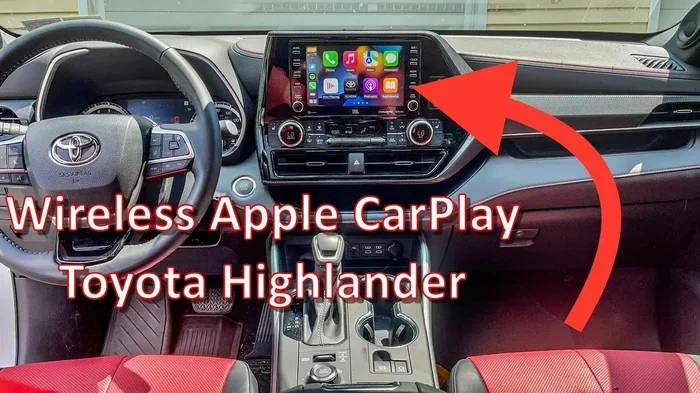
Does the Toyota Highlander Have Wireless Apple CarPlay
The Toyota Highlander offers wireless Apple CarPlay on select newer trims and model years, making it easy to mirror your iPhone without plugging in a cable. Not every Highlander comes with this feature standard, so understanding which trim levels and years include it is essential before you buy or upgrade. In this guide, we break down everything you need to know about wireless Apple CarPlay availability, setup, and troubleshooting.
The Toyota Highlander has been one of the most popular three-row SUVs on the road for years. Families love it for its spacious interior, strong safety ratings, and modern tech features. One question buyers ask a lot is whether the Toyota Highlander supports wireless Apple CarPlay. If you rely on your iPhone for navigation, music, and hands-free calling, you want to know this before you commit to a purchase.
Let us walk through everything you need to know about wireless CarPlay on the Highlander. We will cover which trims have it, how to set it up, and what to do if something goes wrong. By the end, you will feel confident about whether this SUV fits your digital lifestyle.
Key Takeaways
- Wireless Apple CarPlay is available: Select Toyota Highlander trims and model years include wireless Apple CarPlay as a standard or optional feature.
- Trim level matters: Higher trims like the XLE and Limited are more likely to include wireless CarPlay compared to base models.
- Setup is simple: Connecting your iPhone wirelessly takes just a few taps once your system is compatible.
- Wired vs. wireless: Wireless CarPlay offers more convenience but may have slightly different performance characteristics than a wired connection.
- Troubleshooting helps: Common issues like connection drops can often be fixed with simple resets or software updates.
- Other tech features complement CarPlay: The Highlander’s infotainment system includes navigation, voice commands, and smartphone integration beyond just Apple CarPlay.
📑 Table of Contents
- What Is Wireless Apple CarPlay?
- Does the Toyota Highlander Have Wireless CarPlay?
- How to Set Up Wireless Apple CarPlay on Your Highlander
- Wireless CarPlay vs. Wired CarPlay on the Highlander
- Other Tech Features in the Toyota Highlander
- Common Wireless CarPlay Issues and How to Fix Them
- Which Toyota Highlander Model Year Should You Choose for Wireless CarPlay?
- Final Thoughts
What Is Wireless Apple CarPlay?
Wireless Apple CarPlay lets you connect your iPhone to your car’s infotainment system without using a USB cable. Instead, your phone pairs with the car over a Wi-Fi connection. Once paired, you get access to your apps, music, calls, and messages right on the touchscreen.
This is a big step up from older methods. With wired CarPlay, you had to find the right cable and plug it in every time. Wireless CarPlay handles the connection automatically when you get in the car. Your phone just links up, and you are ready to go.
Not all cars support wireless CarPlay, though. Some only offer the wired version. That is why it is so important to check before you buy. The Toyota Highlander has made progress here, but the feature depends on the model year and trim level.
The beauty of wireless Apple CarPlay is how seamless it feels. You get Siri voice control, real-time traffic updates through Apple Maps, and the ability to use your favorite apps without taking your hands off the wheel. It makes the driving experience much safer and more enjoyable.
Does the Toyota Highlander Have Wireless CarPlay?
The short answer is yes, but with some important conditions. The Toyota Highlander offers wireless Apple CarPlay on certain trims and model years. It is not available across the board, so you need to know exactly what to look for.
Model Year Considerations
Toyota started offering wireless CarPlay on the Highlander around the 2020 model year and expanded it further in later years. If you are looking at a used Highlander, the model year matters a lot. Older models from before 2019 generally only support wired CarPlay or may not have it at all.
For the 2021, 2022, and 2023 model years, wireless Apple CarPlay became more widely available. The latest 2024 and 2025 Highlanders include it on most trims as standard or as part of a technology package. Always double-check the specific vehicle’s features when shopping.
Trim Level Breakdown
Here is a general look at how wireless CarPlay availability breaks down by Highlander trim:
- LE (Base Trim): Often comes with a standard infotainment system that may only offer wired CarPlay. Wireless CarPlay might require an optional upgrade.
- XLE: More likely to include wireless Apple CarPlay as a standard feature or part of a convenience package.
- XSE: This sporty trim typically includes the wireless CarPlay feature as part of its tech upgrades.
- Limited: Almost always comes with wireless CarPlay standard, along with premium audio and other high-end features.
- Platinum: The top-tier trim includes the full suite of tech features, including seamless wireless Apple CarPlay.
Keep in mind that Toyota sometimes changes what comes standard from one year to the next. Always confirm with the dealer or check the vehicle window sticker to verify wireless CarPlay availability.
How to Set Up Wireless Apple CarPlay on Your Highlander
Setting up wireless Apple CarPlay on your Highlander is straightforward. Here is what you need to do step by step.
- Make sure your iPhone is compatible. Wireless CarPlay works with iPhone 12 and later models. If you have an older iPhone, you may need to stick with the wired connection.
- Turn on Bluetooth and Wi-Fi on your iPhone. Wireless CarPlay uses both of these connections to link with your car.
- Put your car in park and start the engine.
- Go to the Settings menu on the Highlander’s touchscreen. Look for the Apple CarPlay or Connected Services option.
- Select Wireless CarPlay and follow the prompts to pair your iPhone.
- Accept the permissions on your phone when prompted. This allows your car to access contacts, messages, and other features.
- Test the connection by opening a music app or using Apple Maps for directions.
Once paired, your Highlander should automatically connect to your iPhone every time you get in the car. You will see the CarPlay interface on the touchscreen, and you can start using your apps right away.
Tips for a Smooth Setup
- Restart both devices if the connection does not work the first time. A simple reboot often fixes pairing issues.
- Update your iPhone to the latest iOS version before setting up. This ensures full compatibility with the Highlander’s system.
- Delete old paired devices from your car’s system if you are having trouble. Fresh pairings work better in most cases.
- Keep your phone unlocked during the initial setup process so the car can access everything it needs.
Wireless CarPlay vs. Wired CarPlay on the Highlander
Both wireless and wired Apple CarPlay give you access to the same core features. You get your apps, music, calls, and navigation on the big screen either way. But there are some differences worth knowing about.
| Feature | Wireless CarPlay | Wired CarPlay |
|---|---|---|
| Connection Method | Wi-Fi and Bluetooth | USB cable |
| Convenience | Automatic, no cables needed | Must plug in each time |
| Connection Stability | Generally reliable | Very stable |
| Charging During Use | Phone charges separately | Phone charges through cable |
| Availability on Highlander | Select trims and years | Widely available |
| Setup Speed | Fast after initial pairing | Instant |
Most drivers prefer wireless CarPlay because of the convenience factor. You do not have to fumble with a cable every time you get in the car. The connection feels more seamless and integrated with your daily routine.
That said, wired CarPlay has one big advantage: it charges your phone while you drive. If your battery is low and you do not have a wireless charger, a USB connection keeps your phone powered up. For long road trips in the Toyota Highlander, this can be a real benefit.
Some users also report that wired connections feel slightly more stable. Wireless CarPlay can occasionally drop the connection, especially in areas with poor Wi-Fi signal. But for most daily driving situations, the wireless version works flawlessly.
Other Tech Features in the Toyota Highlander
The Highlander’s tech package goes well beyond just Apple CarPlay. Toyota has equipped this SUV with several features that make driving safer and more connected.
Toyota Entune Infotainment System
The Highlander uses the Toyota Entune infotainment system. This system supports both Apple CarPlay and Android Auto on compatible models. The touchscreen display is responsive and easy to navigate, with large icons and clear menus.
The system also includes built-in navigation on higher trims. You can get turn-by-turn directions without needing to rely on your phone. This is especially helpful when you are traveling to unfamiliar areas with the whole family.
Voice Commands and Siri Integration
One of the best parts of wireless Apple CarPlay on the Highlander is Siri integration. You can use voice commands to make calls, send texts, set reminders, and get directions. Just hold down the voice command button on the steering wheel and speak naturally.
This keeps your hands on the wheel and your eyes on the road. It is one of the safest ways to use your phone while driving, and it works beautifully with the Toyota Highlander system.
Wi-Fi Hotspot Capability
Some Highlander models include a Wi-Fi hotspot feature. This lets you create a personal network in your car. You can connect multiple devices, including tablets and laptops. It is a great feature for families who need to stay connected on long trips.
Keep in mind that this is different from the wireless CarPlay connection. The Wi-Fi hotspot provides internet access, while CarPlay mirrors your phone’s interface on the car’s screen. Both features work together to make your Highlander a connected hub.
Remote Connect Services
Toyota offers a suite of remote services through its app. You can lock and unlock your doors, start the engine remotely, and check your vehicle’s status from your phone. These features work alongside Apple CarPlay to give you full control over your Highlander from anywhere.
If you are interested in adding remote start to your Highlander, it is worth checking whether your specific model supports this feature. Some trims include it standard, while others offer it as an add-on.
Common Wireless CarPlay Issues and How to Fix Them
Even though wireless Apple CarPlay is designed to work smoothly, you might run into issues from time to time. Here are the most common problems and how to solve them.
Connection Drops Frequently
If your CarPlay connection keeps dropping, the first thing to check is your Wi-Fi signal. The Highlander creates a Wi-Fi network for CarPlay to communicate with your phone. If the signal is weak, the connection may be unstable.
Try moving your phone closer to the center console. Also, make sure no other devices are interfering with the connection. Restarting both your phone and the car’s infotainment system often fixes this issue.
CarPlay Does Not Appear Automatically
Sometimes CarPlay does not launch on its own when you get in the car. This usually happens when Bluetooth or Wi-Fi is turned off on your phone. Check that both are enabled before you start the engine.
You can also go into the car’s settings and manually select Apple CarPlay from the source menu. If the problem persists, try unpairing and re-pairing your device. This refreshes the connection and often solves the issue.
Audio or Video Glitches
If you experience choppy audio or video while using CarPlay, a software update might be needed. Make sure your iPhone is running the latest version of iOS. Similarly, check if Toyota has released any infotainment software updates for your Highlander.
You can visit a Toyota dealer to have the system updated. They can also check for any recalls or known issues related to CarPlay functionality on your specific model year.
Phone Does Not Charge Wirelessly
Remember that wireless CarPlay does not charge your phone. If you need your phone to charge while driving, you will need a separate wireless charging pad or a USB cable. Some Highlander trims come with a built-in wireless charging pad, which is a nice bonus.
If your Highlander does not have a charging pad, you can install an aftermarket one. Just make sure it is compatible with your phone and does not interfere with the CarPlay connection.
Which Toyota Highlander Model Year Should You Choose for Wireless CarPlay?
If wireless Apple CarPlay is a must-have for you, here is a quick guide to choosing the right Highlander.
For the newest tech and most reliable wireless CarPlay, go with a 2023 or 2024 model year. These Highlanders come with the latest infotainment system and the best wireless connectivity. The 2022 model year is also a solid choice if you are looking at used vehicles.
If you are shopping on a budget, look for the XLE or XSE trim on a 2021 or 2022 Highlander. These often include wireless CarPlay as standard or at a lower price point than the higher trims. The base LE trim might require a package upgrade to get wireless connectivity.
When buying used, always ask the seller or dealer to confirm wireless CarPlay is included. Do not just assume based on the model year. Ask to see the feature in action during a test drive. This is the best way to make sure everything works as expected.
Also, consider how the Highlander’s tech features fit into your daily life. If you use Apple Maps for navigation, listen to podcasts, and make hands-free calls regularly, wireless CarPlay will feel like an essential part of your driving routine. It really does make the experience smoother and safer.
The Toyota Highlander remains one of the best family SUVs on the market, and the addition of wireless Apple CarPlay makes it even more appealing for anyone who stays connected on the go.
Final Thoughts
The Toyota Highlander does offer wireless Apple CarPlay, but only on specific trims and model years. If this feature matters to you, take the time to confirm it is included in the vehicle you are considering. The convenience of going cable-free is well worth it, and once you experience it, you will not want to go back.
From setup to daily use, wireless CarPlay on the Highlander works smoothly and reliably. Pair it with the SUV’s other tech features, and you get a connected, modern driving experience that fits today’s families perfectly. Whether you are commuting to work or heading out on a family road trip, wireless Apple CarPlay keeps you connected, informed, and safe on the road.