Does the Toyota Veloz E Have Apple CarPlay Built In
The Toyota Veloz E is a popular compact MPV in select markets, and many buyers wonder about smartphone connectivity. This guide covers whether Apple CarPlay is available, how it works, and what you need to know before buying. We break down the infotainment system, wireless and wired options, and practical tips for getting the most out of your Toyota Veloz E tech features.
The Toyota Veloz E has become a go-to choice for families and daily commuters in several markets. One of the first questions buyers ask is whether their new ride supports modern tech like Apple CarPlay. In this article, we dive deep into the Toyota Veloz E Apple CarPlay situation. You will learn exactly what to expect, how to set it up, and whether this compact MPV delivers the smartphone connectivity you need.
Let us be clear from the start. The Toyota Veloz E does come with Apple CarPlay support on many trim levels. But the details matter. Not every version of this vehicle offers the same tech package. Some trims give you wireless Apple CarPlay, while others need a cable. We will walk you through all of it so you do not walk into a dealership blind.
The Toyota Veloz E sits in the compact MPV segment. It competes with the Suzuki Ertiga, Mitsubishi Xpander, and similar models. In this crowded space, infotainment features can make or break a sale. Buyers today expect seamless phone integration, and Toyota has delivered on that front with the Veloz E. The question is whether it meets your specific needs.
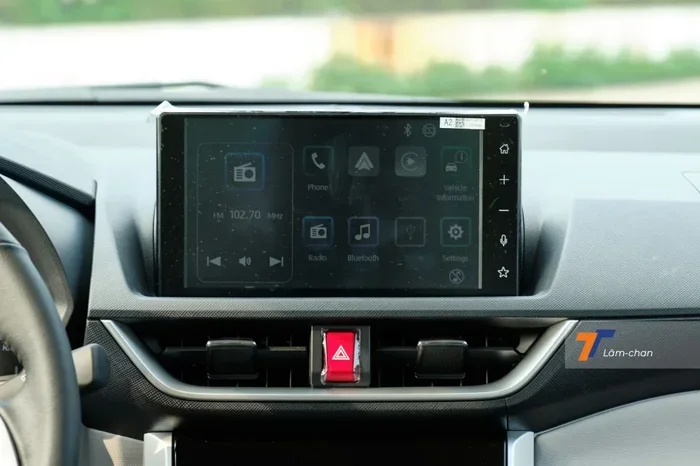
The Toyota Veloz E offers a solid infotainment system that keeps you connected on the road. The centerpiece is a touchscreen display that supports both Apple and Android smartphone integration. Depending on the trim, you get different levels of tech functionality.
Standard Infotainment Features
On most trim levels, the Veloz E comes with a touchscreen multimedia system that includes radio, Bluetooth, and USB connectivity. These basics are important. They let you stream music, take calls, and charge your phone while driving. But the real draw is the smartphone projection feature, which is where Apple CarPlay comes in.
The standard system also supports Bluetooth audio streaming and hands-free calling. These features have been around for a while, and they work reliably. However, they do not replace the convenience of having your iPhone screen mirrored on the car display. That is exactly what Apple CarPlay brings to the table.
Apple CarPlay Integration Details
When Apple CarPlay is available on the Veloz E, it offers a familiar interface. You get access to Apple Maps, Spotify, Messages, Phone, and more. The system responds to Siri voice commands, so you can keep your hands on the wheel. Navigation, music, and calls all become safer and more convenient with this integration.
Some versions of the Veloz E support wireless Apple CarPlay, which means no cables clutter your dashboard. Other trims rely on a USB connection. Both options work well, but wireless is clearly more convenient. It is worth checking which version you are buying.
The Toyota Veloz E comes in several trim levels, and the tech features vary between them. Understanding these differences helps you choose the right version for your needs.
Trim Levels and Tech Packages
Toyota typically offers the Veloz E in multiple trims. The lower trims may include a basic infotainment system with Bluetooth and a USB port. Higher trims step up to a touchscreen with Apple CarPlay and sometimes Android Auto as well. The exact trim names and features depend on the market, so always check the local Toyota brochure.
Here is a general breakdown of what you can expect:
- Base Trim: Basic audio system, Bluetooth, USB port. Apple CarPlay may or may not be included depending on the market.
- Mid-Level Trim: Touchscreen display with smartphone integration. Apple CarPlay support is more likely at this level.
- Top Trim: Full-featured infotainment with wireless Apple CarPlay, larger screen, and additional connectivity options.
Wired vs Wireless Apple CarPlay
The difference between wired and wireless Apple CarPlay is significant. With a wired connection, you plug your iPhone into a USB port. The car display mirrors your phone screen. It works well, but you need a cable every time. Wireless Apple CarPlay connects automatically when you sit in the car. No cables, no hassle. It feels more seamless and modern.
If wireless Apple CarPlay is important to you, make sure you choose a trim that includes it. Not all versions of the Veloz E offer this feature. Ask the dealer or check the specifications before you commit to a purchase.
Setting up Apple CarPlay on the Toyota Veloz E is a straightforward process. Whether you have a wired or wireless connection, the steps are simple and user-friendly.
How to Connect Apple CarPlay
For a wired connection, follow these steps:
- Plug your Lightning or USB-C cable into your iPhone.
- Connect the other end to the car USB port.
- Your infotainment screen should display the Apple CarPlay interface automatically.
- If it does not, tap the Apple CarPlay icon on the screen.
For wireless Apple CarPlay, the process is even easier:
- Make sure Bluetooth is turned on in your iPhone settings.
- Park the car and ensure the ignition is on.
- The Veloz E infotainment system should detect your iPhone automatically.
- Tap “Connect” on the screen to start using Apple CarPlay.
Tips for a Smooth Connection
Sometimes Apple CarPlay does not connect right away. Do not panic. Try these quick fixes. First, make sure your iPhone is updated to the latest iOS version. Second, restart your phone and try again. Third, if you are using a wired connection, try a different USB cable or port. Fourth, delete the existing CarPlay pairing on your phone and re-pair it. These steps resolve most connectivity issues.
It is also worth noting that Apple CarPlay works best when your phone has enough storage space. If your iPhone is nearly full, the connection may lag or fail. Keep your phone storage in check for the best experience.
One of the biggest advantages of Apple CarPlay in the Toyota Veloz E is access to navigation. Apple Maps provides turn-by-turn directions with traffic updates. You can also use Google Maps through CarPlay if you prefer. The large infotainment screen makes it easy to see directions clearly, even in bright sunlight.
Beyond navigation, Apple CarPlay gives you access to a wide range of apps. Spotify, podcasts, audiobooks, and messaging apps all work through the car system. You can even make and receive calls using Siri voice commands. This level of smartphone integration makes the Veloz E feel modern and connected.
How does the Veloz E compare to its rivals in the compact MPV segment? Let us look at a few competitors.
| Feature | Toyota Veloz E | Suzuki Ertiga | Mitsubishi Xpander |
|---|---|---|---|
| Apple CarPlay | Available on select trims | Available on higher trims | Available on most trims |
| Wireless Connectivity | On top trims | Limited | Available on select trims |
| Screen Size | 8-inch touchscreen | 7-inch touchscreen | 8-inch touchscreen |
| USB Ports | 2 USB ports | 2 USB ports | 2 USB ports |
| Bluetooth | Standard | Standard | Standard |
As you can see, the Toyota Veloz E holds its own against competitors. The infotainment system is competitive, and Apple CarPlay availability is on par with rivals. Where the Veloz E shines is in overall build quality and Toyota reliability.
One thing to keep in mind is that Toyota dealers can help you confirm which trim of the Veloz E includes Apple CarPlay in your region. Availability can vary by country and even by state. Always double-check before finalizing your purchase.
Owning a Toyota Veloz E with Apple CarPlay comes with a few practical benefits. Here are some tips to get the most out of your system.
Keep Your iPhone Updated
Apple CarPlay works best with the latest iOS version. Toyota regularly updates its infotainment software too. Keeping both your phone and car system updated ensures the best performance and compatibility.
Use Quality Cables
If you rely on a wired connection, invest in a good-quality Lightning or USB-C cable. Cheap cables can cause connection drops and slow charging. A reliable cable makes a big difference in your daily driving experience.
Explore Siri Shortcuts
Siri voice commands let you control Apple CarPlay without touching your phone. You can ask Siri to call someone, play a playlist, or navigate to a location. This feature is especially useful for safety while driving.
Consider a Car Mount
Even with Apple CarPlay, having a phone mount can be helpful. It gives you a second reference point for navigation and makes it easier to use your phone for other tasks when parked.
Not every Toyota Veloz E owner has a smooth experience with Apple CarPlay. Here are some common mistakes to avoid.
Common Mistakes to Avoid
- Assuming All Trims Have Apple CarPlay: Always verify the trim level before buying. The base trim may not include this feature.
- Ignoring Software Updates: Skipping updates can lead to connectivity issues. Keep both your phone and car system current.
- Using Damaged Cables: A frayed or low-quality USB cable can cause connection problems. Replace cables regularly.
- Overloading Your iPhone: A nearly full phone can slow down Apple CarPlay performance. Keep at least 10% free storage.
- Not Checking Market-Specific Features: The Veloz E is sold in multiple markets, and features vary. What is available in one country may not be in another.
The Toyota Veloz E is a well-rounded compact MPV that offers modern connectivity features. The inclusion of Apple CarPlay on select trims makes it a compelling choice for iPhone users. With a user-friendly infotainment system, reliable smartphone integration, and competitive tech specs, the Veloz E holds its own in its class.
Whether you choose the wired or wireless version of Apple CarPlay, you will enjoy a safer and more connected driving experience. The ability to use Apple Maps, Siri, and your favorite apps without taking your hands off the wheel is a real advantage. Just make sure you pick the right trim level for your needs.
Before you buy, visit your local Toyota dealer and ask about Apple CarPlay availability on the Veloz E. Test the system in person. See how it feels in the car. This hands-on experience will help you make a confident decision. The Toyota Veloz E is a strong choice for anyone who values both practicality and modern tech.
Toyota continues to invest in its infotainment technology across its lineup. The Veloz E is no exception. With each new model year, the smartphone integration features get better and more refined. If you are currently in the market for a compact MPV, the Toyota Veloz E deserves a close look.
Also, if you are curious about other Toyota tech features, check out how Toyota dealers handle service for various models. And if you are wondering about Toyota connectivity in general, it is worth exploring how features like remote start and keyless entry work on Toyota vehicles. These tech features add real value to your ownership experience.
Finally, remember that the Toyota Veloz E is not just about tech. It is a practical, reliable family vehicle that happens to come with modern connectivity. The combination of Toyota reliability and Apple CarPlay convenience makes it a strong contender in the compact MPV segment. Whether you use it for daily commutes or weekend road trips, the Veloz E delivers on both fronts.
Key Takeaways
- Apple CarPlay Availability: The Toyota Veloz E does support Apple CarPlay, but availability depends on the trim level and market.
- Wired and Wireless Options: Some trim levels offer wireless Apple CarPlay, while others require a USB connection.
- Infotainment Screen: The Veloz E features a decent-sized touchscreen that supports smartphone integration for navigation and media.
- Setup Is Simple: Connecting your iPhone takes just a few steps, and the process is straightforward for most users.
- Competitor Comparison: The Veloz E holds its own against rivals like the Suzuki Ertiga and Mitsubishi Xpander in the tech features department.
- Future Updates: Toyota continues to improve its infotainment system, so newer model years may offer enhanced connectivity.
Frequently Asked Questions
Does the Toyota Veloz E have Apple CarPlay on all trim levels?
No, Apple CarPlay availability depends on the trim level and market. Higher trims are more likely to include this feature. Always check the specifications for your specific model before purchasing.
Can I use wireless Apple CarPlay on the Toyota Veloz E?
Yes, some trim levels of the Toyota Veloz E support wireless Apple CarPlay. This feature eliminates the need for a cable and connects automatically via Bluetooth. Check your trim level to confirm availability.
How do I update Apple CarPlay on my Toyota Veloz E?
Apple CarPlay updates come through your iPhone iOS update. Make sure your phone is running the latest version of iOS. The car infotainment system also receives updates through Toyota service centers in some markets.
Can I use Apple Maps with Apple CarPlay on the Veloz E?
Yes, Apple Maps works seamlessly with Apple CarPlay on the Veloz E. You get turn-by-turn navigation with real-time traffic updates. You can also use Google Maps or Waze through CarPlay if you prefer.
What should I do if Apple CarPlay keeps disconnecting on my Veloz E?
Try restarting your iPhone and the car infotainment system. Check your USB cable for damage if you are using a wired connection. Also, make sure your phone has enough storage and is running the latest iOS version. Re-pairing the devices often resolves the issue.
Is Apple CarPlay available on used Toyota Veloz E models?
It depends on the model year and trim. Newer used models are more likely to include Apple CarPlay. Always ask the seller or check the vehicle specifications to confirm before buying a used Veloz E.
=== CONCLUSION ===
The Toyota Veloz E is a solid compact MPV that brings modern smartphone connectivity to the table. Apple CarPlay support is available on select trims, giving iPhone users a convenient and safe way to stay connected on the road. Whether you prefer a wired or wireless setup, the Veloz E delivers a user-friendly infotainment experience that fits the needs of modern drivers and families.
Before you buy, do your homework. Confirm the trim level, check for Apple CarPlay availability, and test the system in person. A little research goes a long way in ensuring you get the right vehicle for your needs. The Toyota Veloz E is a smart choice for anyone who wants reliability, practicality, and modern tech all in one package. Drive smart, stay connected, and enjoy the ride.