How Do I Activate My Toyota Remote Step by Step Guide
Activating your Toyota Remote is simple when you follow the right steps. This guide walks you through programming, pairing, and testing your Toyota key fob with clear instructions. You will learn how to set up remote lock, remote start, and other Toyota Remote functions quickly.
Activating your Toyota Remote might seem tricky at first, but it is actually quite simple once you know the steps. Whether you just bought a new Toyota or replaced a lost key fob, this guide will walk you through everything you need to know. You will learn how to program your Toyota key fob, pair it with your vehicle, and test all the functions. By the end, you will feel confident handling your Toyota Remote on your own.
Many Toyota owners skip reading the manual and end up confused when the remote does not work right away. This happens all the time. The good news is that activating a Toyota Remote does not require a trip to the dealer in most cases. With a few simple tools and about ten minutes of your time, you can have your Toyota key fob fully programmed and ready to go. Let us dive in and get your remote working perfectly.
Before we start, it helps to understand what your Toyota Remote can do. Most Toyota remotes let you lock the doors, unlock the doors, open the trunk, and even start the engine from a distance. Some newer models also support phone-based controls through the Toyota app. If you are wondering whether you can roll down your Toyota windows with the key fob, the answer depends on your model year and trim level. We will cover all of this in detail below.
Key Takeaways
- Toyota Remote activation is easy: You can program your key fob at home in about 10 minutes without visiting a dealer.
- Battery health matters: A weak Toyota key fob battery is the most common cause of remote failure. Replace it every 1 to 2 years.
- Multiple remote functions exist: Your Toyota Remote can lock, unlock, start the engine, open the trunk, and trigger the panic alarm.
- Phone alternatives are available: Newer Toyota models support app-based remote control through Toyota Remote Connect and the Toyota app.
- Troubleshooting is straightforward: Most Toyota Remote issues can be fixed with a battery swap, reset, or reprogramming session.
- Protect your remote: Keep it away from moisture, extreme heat, and strong electromagnetic fields to extend its lifespan.
- Programming varies by model: The steps differ slightly between Toyota Corolla, Camry, RAV4, and other models. Always check your owner manual first.
📑 Table of Contents
Understanding Your Toyota Remote
To activate your Toyota Remote properly, you first need to understand what it is and how it works. A Toyota Remote is a small handheld device that communicates with your car using radio frequency signals. When you press a button, the remote sends a coded signal to your vehicle’s receiver. The car then performs the matching action, such as locking the doors or starting the engine.
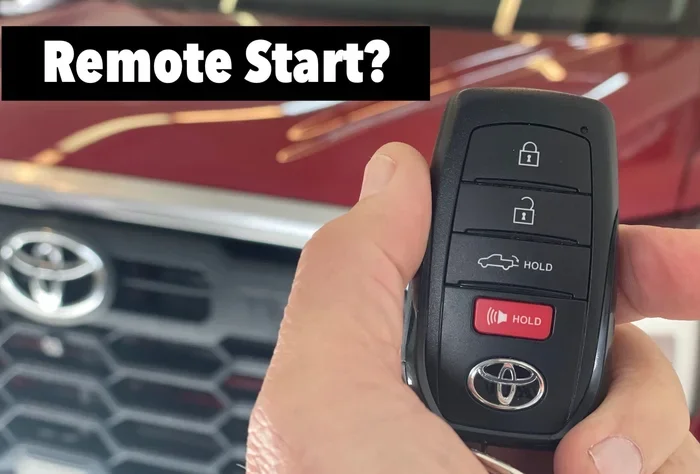
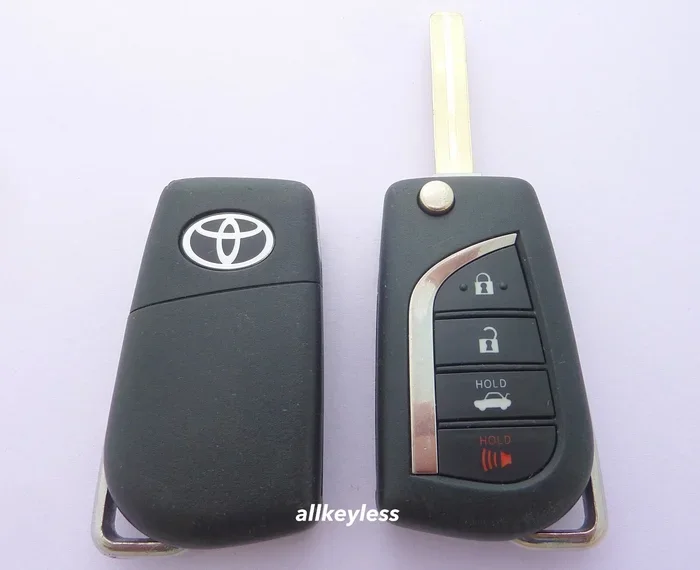
Toyota has used different remote technologies over the years. Older models use a basic remote with separate buttons for lock, unlock, and trunk. Newer models feature a Smart Key system that allows push button start and proximity-based entry. Understanding which type of Toyota Remote you have will help you follow the right activation steps.
What Does a Toyota Remote Do?
Your Toyota Remote handles several important functions every day. Here are the most common ones:
- Remote Lock: Locks all doors with a single button press. This is great for quick stops at the gas station.
- Remote Unlock: Unlocks all doors so you can enter without using the physical key.
- Trunk Release: Opens the rear trunk or liftgate from a distance.
- Remote Start: Starts the engine so you can warm up or cool down the car before getting in.
- Panic Alarm: Triggers the horn and lights if you feel unsafe or notice someone near your vehicle.
Each of these functions requires proper Toyota Remote activation. If one or more buttons stop working, it usually means the remote needs reprogramming or a new battery. Knowing what your Toyota Remote should do helps you spot problems early.
Types of Toyota Remotes
Not all Toyota remotes look the same. Here are the main types you might encounter:
- Standard Key Fob: Found on older Toyota models like the 2010 Corolla or 2012 Camry. It has physical buttons and a standard key blade.
- Smart Key Fob: Used on newer models like the 2018 RAV4 and 2020 Highlander. It supports push button start and does not need the key inserted.
- Phone-Based Remote: Available on select 2021 and newer Toyota models. You control the car through the Toyota app on your smartphone.
The activation process varies slightly depending on which type you have. We will cover each one in the steps below.
How to Activate Your Toyota Remote Step by Step
Now that you understand your Toyota Remote, let us walk through the activation process. Follow these steps carefully and you will have your remote working in no time.
Step 1: Check the Battery
Before you try anything else, check the battery in your Toyota key fob. A dead or weak battery is the number one reason remotes fail to work. Most Toyota remotes use a small CR2025 or CR2032 coin cell battery.
Here is how to check and replace it:
- Flip the key fob over and locate the small release latch.
- Slide the back cover off the fob gently.
- Remove the old battery and note the positive side facing up.
- Insert a new CR2025 or CR2032 battery with the positive side facing up.
- Snap the back cover back into place.
After replacing the battery, try pressing any button. If the remote still does not respond, move on to Step 2. A fresh Toyota key fob battery should last about two years under normal use.
Step 2: Enter Programming Mode
Programming mode lets your Toyota car accept a new or reset remote. The process is slightly different for each model, but the general steps are similar. Here is a common method that works on many Toyota vehicles:
- Sit in the driver seat and close all doors.
- Turn the ignition to the “ON” position without starting the engine.
- Press and hold the lock button on the Toyota Remote for about five seconds.
- Within 40 seconds, press and hold the lock button again for two seconds.
- Release both buttons. The doors should lock and then unlock, confirming you are in programming mode.
If your Toyota does not respond this way, check your owner manual for model-specific instructions. Some Toyota models require you to cycle the key in the ignition three times quickly to enter programming mode. The Toyota key fob programming process is designed to be secure, so it always requires a specific sequence.
Step 3: Pair the Remote
Once you are in programming mode, you can pair your Toyota Remote to the vehicle. Here is what to do next:
- Press the lock button on the Toyota Remote within 30 seconds of entering programming mode.
- You should hear the doors lock and then unlock again. This confirms the car accepted the signal.
- Repeat this step for any additional remotes you want to program.
- Turn the ignition off and exit the vehicle.
Test each remote by standing a few feet away and pressing the lock button. If the doors respond, your Toyota Remote activation is complete. If a remote does not work, repeat the pairing process from Step 2.
One thing to keep in mind: Toyota vehicles typically store memory for up to four remotes. If you need to add a fifth remote, you may need to erase all existing remotes first. This is a security feature that prevents unauthorized access to your vehicle.
Step 4: Test Your Toyota Remote
Testing is the final and most important step. Do not skip it. Walk a few feet away from your Toyota and try each function:
- Lock: Press the lock button. All doors should lock, and you may hear a chirp or see the lights flash.
- Unlock: Press the unlock button. All doors should unlock.
- Trunk: Press the trunk button. The liftgate should pop open.
- Panic: Press and hold the panic button. The horn should sound and the lights should flash.
- Remote Start (if equipped): Press the remote start button twice quickly. The engine should start, and the parking lights should flash.
If all functions work, congratulations. Your Toyota Remote is fully activated and ready to use. If something does not work, go back to the programming steps or check the battery. You can also refer to our guide on how to check if your starter motor is bad if the engine does not respond to remote start commands.
Key Toyota Remote Functions
Your Toyota Remote does more than just lock and unlock doors. Understanding all the functions helps you get the most out of your vehicle. Here is a closer look at what each button does and how to use it effectively.
Remote Lock and Unlock
The lock and unlock buttons are the most used functions on any Toyota Remote. Pressing lock secures all doors, windows (if power windows are equipped), and the sunroof. Pressing unlock releases all doors and lets you enter the vehicle.
Here are some useful tips for these functions:
- Press unlock once to open the driver door only. Press it twice to unlock all doors.
- Some Toyota models let you customize the lock confirmation sound. You can turn it off if it bothers you.
- If you unlock your Toyota with your phone using the Toyota app, the physical remote still works as a backup.
- The remote range is typically about 60 feet. Stand closer if the signal does not reach.
These simple functions add a lot of convenience to your daily routine. Whether you are carrying groceries or rushing to get inside during rain, the Toyota Remote lock and unlock features save you time and effort.
Remote Start and Trunk Release
Remote start is one of the most popular Toyota Remote features. It lets you start the engine from outside the vehicle. This is especially helpful in cold winter mornings or hot summer afternoons.
To use remote start:
- Make sure the car is parked in a safe, well-ventilated area.
- Press the remote start button twice within three seconds.
- The engine should start, and the parking lights will flash.
- The car will run for about 10 to 15 minutes before shutting off automatically.
- Enter the vehicle and press the brake pedal to drive.
The trunk release button is equally handy. Press it once, and the trunk pops open. This is perfect for loading luggage or groceries without fumbling with a physical key.
Some Toyota owners wonder whether they can add remote start to their vehicle if it does not come with it. The answer is yes in many cases. You can add remote start to your Toyota through an aftermarket kit or a dealer installation. This upgrade works on most Toyota models and adds significant convenience.
Trunk Release and Panic Alarm
The trunk release and panic alarm are two functions that many people overlook but find incredibly useful. The trunk release button opens the rear cargo area from up to 60 feet away. This is especially helpful when your hands are full.
The panic alarm serves as a security feature. Press and hold the panic button, and the horn will sound loudly while the lights flash. This draws attention and can deter potential thieves. It also alerts you if you accidentally leave the car unlocked in a parking lot.
Together, these Toyota Remote functions give you control, security, and convenience every time you use your vehicle.
Troubleshooting Your Toyota Remote
Even with proper Toyota Remote activation, issues can still happen. The good news is that most problems are easy to fix. Here are the most common issues and how to solve them.
Remote Not Working After Battery Replacement
If you replaced the battery but your Toyota Remote still does not work, do not panic. This is a common situation, and the fix is usually simple.
Try these steps first:
- Reprogram the remote: Sometimes a new battery requires you to go through the programming process again. Follow the steps in Section 2 above.
- Check the battery orientation: Make sure the positive side of the battery faces the correct direction. A backwards battery will not work.
- Clean the battery contacts: Use a dry cloth to wipe the metal contacts inside the fob. Dirt or corrosion can block the signal.
- Try the spare remote: If your second remote works, the problem is with the first remote, not the car.
If none of these steps work, the remote itself may be damaged. Water exposure, drops, and extreme heat can all damage the internal electronics. In that case, you may need a Toyota key fob replacement.
Toyota Remote Not Responding at All
If your Toyota Remote does not respond at all, the problem could be with the car’s receiver rather than the remote. Try these troubleshooting steps:
- Stand very close to the car and press the lock button. If it works from close range but not from far away, the remote battery is weak.
- Check if the car battery is low. A weak car battery can affect the receiver’s ability to pick up remote signals.
- Look for interference. Other electronic devices near the fob or the car can sometimes block the signal.
- Make sure you are within the remote’s operating range, which is typically about 60 feet.
If the problem persists, it could be an issue with the Toyota Remote receiver module. A dealer or qualified mechanic can diagnose this using a diagnostic scanner. In most cases, the fix is straightforward and affordable.
Tips to Keep Your Toyota Remote Working Well
A little prevention goes a long way when it comes to your Toyota Remote. Follow these simple tips to keep your remote working reliably for years.
Battery Replacement Schedule
Replace your Toyota key fob battery every 12 to 18 months. You do not need to wait for it to die completely. A proactive replacement prevents the frustration of a dead remote at the worst possible moment. Keep a spare CR2025 or CR2032 battery in your glove box so you can swap it instantly if needed.
Protecting Your Remote From Damage
Your Toyota Remote is a small electronic device that deserves care. Here are some easy ways to protect it:
- Keep it dry: Water damage is one of the leading causes of remote failure. Do not leave it in a wet pocket or expose it to heavy rain.
- Avoid extreme heat: Leaving the remote on a dashboard in direct sunlight can damage the internal circuitry over time.
- Store it safely: Use the provided key fob case or a small pouch to prevent drops and scratches.
- Keep it away from strong magnets: Magnets can interfere with the remote’s internal electronics and disrupt the signal.
Taking care of your Toyota Remote extends its lifespan and saves you money on replacements. A well-maintained remote will serve you reliably for many years.
Using Your Phone as a Toyota Remote Alternative
Toyota has embraced smart technology, and many newer models let you control your car using your phone. This is a fantastic alternative to the physical Toyota Remote, especially if you lose your key fob or want extra convenience.
Toyota App and Remote Connect
The Toyota app connects to your vehicle through the Toyota Remote Connect service. Once paired, you can lock the doors, start the engine, and locate your car from your smartphone. The app works through Bluetooth and cellular connectivity, so you can control your car from almost anywhere.
To set up phone-based Toyota Remote control:
- Download the Toyota app on your smartphone.
- Create an account and link it to your Toyota vehicle using the VIN.
- Follow the in-app prompts to connect your phone to the car.
- Test each function to make sure everything works correctly.
If you own a Rav4 and want to try starting it from your phone, you can start your Rav4 with your phone using the Toyota app on supported models. This feature is a game changer for daily convenience.
Phone-Based Remote Functions
Phone-based Toyota Remote functions include many of the same capabilities as the physical key fob. You can lock the car, unlock the doors, start the engine, and even find your parked vehicle on a map. The range is essentially unlimited as long as you have a cellular connection.
Keep in mind that phone-based remote control requires a compatible Toyota model and an active subscription to Toyota Connected Services. Some features may also depend on your cellular plan and phone operating system. Check with your dealer to see if your Toyota supports these features.
Using your phone as a Toyota Remote is a great backup option. It means you are never completely stranded if your physical remote stops working. Just remember that the physical remote should always be your primary tool, with the phone app as a convenient supplement.
Conclusion
Activating your Toyota Remote does not have to be a stressful experience. With the right steps, a fresh battery, and a little patience, you can program your Toyota key fob in about ten minutes. We covered everything from understanding your Toyota Remote and entering programming mode to testing all functions and troubleshooting common issues.
Remember to replace your Toyota Remote battery regularly, protect the device from damage, and consider using the Toyota app as a phone-based backup. These simple habits keep your remote working reliably for years. If you ever run into problems that you cannot solve, your Toyota dealer is always ready to help. Now go ahead, activate your Toyota Remote, and enjoy the convenience it brings to your daily drive.
Frequently Asked Questions
How do I know if my Toyota Remote battery needs replacing?
You will notice reduced range or the buttons becoming less responsive. Some Toyota models also display a warning message on the dashboard when the key fob battery is low. Replacing the battery every 12 to 18 months prevents this issue entirely.
Can I activate my Toyota Remote without a second working remote?
Yes, you can. The programming process only requires you to be inside the vehicle with the ignition key or Smart Key. You do not need a second working remote to pair a new one. Just follow the programming steps in your owner manual.
How far can my Toyota Remote reach?
Most Toyota remotes have an operating range of about 60 feet. This distance can vary based on obstacles, interference from other electronics, and battery strength. Standing closer to the vehicle improves signal reliability.
What should I do if my Toyota Remote stops working after programming?
First, check the battery. If the battery is good, try reprogramming the remote. If that does not work, there may be an issue with the car’s receiver module. A trip to the dealer or a qualified mechanic can diagnose the problem quickly.
Is Toyota Remote activation the same for all Toyota models?
The general process is similar across most Toyota models, but the exact steps can vary. Models like the Corolla, Camry, and RAV4 may have slight differences in the programming sequence. Always refer to your specific owner manual for model-accurate instructions.
Can I use my phone instead of a physical Toyota Remote?
Yes, on supported Toyota models. The Toyota app and Toyota Remote Connect service let you lock, unlock, and start your car from your phone. This feature requires a compatible vehicle and an active connected services subscription. It works as both a primary tool and a backup to the physical remote.
=== CONCLUSION ===
Your Toyota Remote is one of the most useful features of your vehicle, and activating it correctly ensures you get the most out of every button press. From locking the doors to starting the engine from across the parking lot, a properly programmed Toyota Remote adds comfort, security, and convenience to your daily life. Follow the step-by-step instructions in this guide, keep the battery fresh, and protect the device from damage. With just a little care, your Toyota Remote will serve you reliably for many years to come. Now you have everything you need to activate and maintain your Toyota Remote like a pro.