How Do I Fix My Car System Time and Get Back on the Road
Fixing your car system time is easier than most drivers think. Whether your dashboard clock resets after a battery change or the time is off by hours, this guide walks you through simple fixes for every vehicle type. You will learn the most common reasons your car clock loses sync and the exact steps to correct it yourself.
There is nothing more frustrating than glancing at your dashboard and realizing your car system time is completely wrong. Maybe you just got back from a road trip and the clock says 3 PM when the sun is already setting. Or perhaps your car clock reset to 12:00 after you replaced the battery. Whatever the reason, an incorrect car clock can throw off your whole day.
The good news is that fixing your car system time is usually quick and straightforward. You do not need to be a mechanic or own expensive tools. In most cases, a few taps on your infotainment screen or a simple button combo will get your car clock back on track. This guide covers every common scenario so you can get back on the road with confidence.
We will walk through the reasons your dashboard time goes wrong, the step-by-step fix for different car brands, and when it is worth seeing a professional. By the end, you will know exactly how to handle this common car maintenance issue in just a few minutes.
Key Takeaways
- Battery Issues: A weak or dead car battery is the number one cause of incorrect system time.
- Simple Reset: Most vehicles let you reset the clock through the dashboard menu or a button combination.
- Time Zone Settings: Incorrect time zone or daylight saving time settings can throw off your car clock.
- Dealership Help: Some system glitches require a professional diagnostic scan at a dealership.
- Regular Maintenance: Keeping your car battery healthy helps prevent future time resets.
- Manual Override: You can always set the time manually if the automatic sync fails.
📑 Table of Contents
Why Does Your Car System Time Go Wrong?
Before you jump into fixing the problem, it helps to understand what caused it. Cars today rely on a small internal computer to track the time. When something disrupts that computer, the clock resets or displays the wrong time. Here are the most common reasons this happens.
Dead or Weak Car Battery
The single biggest cause of a car clock resetting is a dead battery. When your battery loses power, the computer loses its memory. This includes your car system time, radio presets, and other personal settings. If you have ever noticed your clock flashing 12:00 after a jump start or battery replacement, this is exactly why.
A weak battery can also cause intermittent time problems. The clock might drift a few minutes each week before suddenly resetting to zero. If you find yourself constantly resetting the time, your battery may be on its way out. Consider having it tested at your next oil change or service visit.
Daylight Saving Time Glitches
Many modern cars automatically adjust for daylight saving time. But sometimes the system gets confused. The clock might spring forward twice or skip the change entirely. This happens more often in older models or vehicles that have not received a recent software update. Manually adjusting the time usually fixes this, but a full system reset may be needed in stubborn cases.
Infotainment System Freeze
Your car’s infotainment screen runs a mini operating system. Just like a phone or computer, it can freeze or glitch. When the system freezes, it may lose track of the correct digital clock in your vehicle. A simple reboot often solves this. We will cover how to do that in the next section.
Incorrect Time Zone Setting
If you recently moved to a new state or drove across time zones, your car might still be set to the old time zone. Some vehicles automatically detect your location and update the time. Others rely on a manual setting. If the auto sync feature is turned off, you will need to update the time zone yourself.
How to Fix Car System Time on Different Vehicles
Every car brand handles clock settings a little differently. Below you will find step-by-step instructions for the most popular vehicle types. Follow the section that matches your car.
Fixing the Clock on Toyota Models
Toyota vehicles make it easy to adjust the system time. Most models use a similar process through the infotainment display.
- Press the Settings button on your touchscreen.
- Look for the Clock or Time option in the menu.
- Select the current time and adjust the hours and minutes.
- Choose your preferred time format (12-hour or 24-hour).
- Confirm your selection and exit the menu.
If your Toyota clock keeps resetting, the battery is likely the culprit. A car battery replacement or a simple charge usually fixes the problem. You can also check if a software update is available through the Toyota app.
Fixing the Clock on Honda and Other Brands
Honda and most other brands follow a similar pattern but with slight differences in the menu layout.
- Turn on the vehicle without starting the engine (accessory mode).
- Press the Display or Info button on the dashboard.
- Navigate to Settings and then Clock.
- Use the dial or touchscreen to set the correct time.
- Save the settings and exit.
For trucks and SUVs from brands like Ford, Chevy, and RAM, the process is nearly identical. Look for a Settings or Vehicle menu on the display screen. If you cannot find the clock option, check the owner’s manual. It will have a section specifically about dashboard clock adjustment.
Fixing the Clock on Older Vehicles Without Screens
Not all cars have fancy touchscreens. Older vehicles often have a simple clock with physical buttons. Look for a button labeled Clock, Time, or a clock icon on the dashboard. Press and hold it to enter adjustment mode. Use the arrow buttons to set the correct time. These simple analog car clocks are very reliable and rarely lose track of time.
Step-by-Step Guide to Resetting Your Car Clock
Sometimes a simple adjustment is not enough. You may need to fully reset the car’s system time. This is especially true after a battery replacement or when the clock refuses to hold the correct time. Here is a general reset process that works for most vehicles.
Step 1: Turn Off the Vehicle
Make sure the car is completely powered off. Remove the key from the ignition or press the start button to shut down. Wait at least 30 seconds. This gives the computer time to fully power down.
Step 2: Disconnect the Battery (If Needed)
For stubborn clock issues, disconnecting the battery can force a full system reset. Use a wrench to loosen the negative (black) cable first. Wait two minutes before reconnecting it. This clears temporary errors in the car’s memory. Be careful when doing this. You will lose radio presets and other personal settings.
Step 3: Reconnect and Power On
Reconnect the battery cable and tighten it securely. Start the car and wait for the infotainment system to fully boot. Navigate to the clock settings and set the correct time. The system should now hold the time correctly.
Step 4: Check for Software Updates
Many modern vehicles receive over-the-air updates. These updates can fix bugs that cause car clock problems. Check your manufacturer’s app or website for available updates. If your car does not have internet access, visit a dealership. They can run a diagnostic scan and install any pending updates. This is a great reason to keep up with regular car maintenance appointments.
If the clock still resets after all of these steps, there may be a deeper electrical issue. A faulty fuse, a loose wiring connection, or a failing computer module could be the cause. At this point, it is time to see a professional.
When to Seek Professional Help
Most car clock issues are easy to fix at home. But some problems need a trained technician. Here are the signs that you should take your vehicle to a shop or dealership.
- The clock resets every time you turn off the car. This points to a battery or electrical system problem.
- Multiple systems are acting up. If the clock is wrong and the radio, gauges, or lights are also glitching, there may be a larger electrical issue.
- The infotainment screen freezes constantly. A recurring freeze could mean the system needs a professional reset or replacement.
- You have tried everything and the clock still will not hold. Sometimes a factory-level reset is the only solution.
If you own a Toyota, you can visit any authorized dealership for help with system time issues. Can I Take My Toyota To Any Dealership For Warranty Work? Yes, you can. Dealerships have the tools and software to run a full diagnostic and fix stubborn clock problems. This is also a good time to ask them to check your car battery health and overall electrical system.
Before you visit, write down the steps you have already tried. This saves time and helps the technician diagnose the problem faster. Many shops offer free diagnostics, so it never hurts to ask.
Preventing Car System Time Issues in the Future
Once you have fixed your car clock, you want to keep it working. Here are simple habits that prevent future time problems.
- Maintain a healthy battery. Have your battery tested every six months. Replace it before it dies completely. A failing battery is the top cause of clock resets.
- Keep your software updated. Check for infotainment updates at least twice a year. Updates fix bugs and improve system stability.
- Avoid draining the battery. Do not leave your lights or infotainment system on when the engine is off. This can drain the battery and cause a time reset.
- Use the correct time zone. If you travel frequently, make sure your car’s time zone setting is set to auto. This prevents the clock from displaying the wrong time after a trip.
- Keep jumper cables in your trunk. A jump start can save you from a dead battery and the frustration of resetting all your car settings again.
These small steps go a long way. They keep your vehicle clock accurate and protect all the other settings in your car’s computer. Think of it as part of your regular car care routine, just like checking your tire pressure or getting an oil change.
Quick Tips for Common Clock Problems
Here are some fast fixes for the most common clock issues drivers face every day.
- Clock is 1 hour off: Check your daylight saving time setting. Turn it on or off depending on the season.
- Clock flashes 12:00: Your battery lost power. Set the time again and have the battery tested.
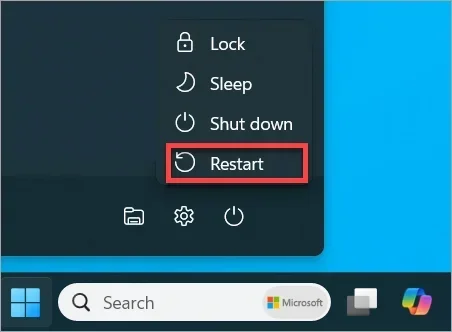
- Clock will not change: Try rebooting the infotainment system. Hold the power button for 10 seconds and restart.
- Clock changes but seconds are wrong: Some cars let you reset the seconds to zero. Look for a reset button in the clock menu.
- Clock is correct but AM/PM is wrong: Switch the time format from 12-hour to 24-hour and back again.
These quick fixes solve the problem in most cases. You do not need to visit a shop or spend money on repairs. A few minutes of your time is all it takes.
Final Thoughts
A broken or incorrect car system time might seem like a small problem. But it adds up. Every time you glance at the dashboard and see the wrong time, it throws off your schedule and your peace of mind. The good news is that you now have all the tools to fix it yourself.
Start with the simplest fix: check the battery and reset the clock through your infotainment menu. If that does not work, try a full system reset or update your software. And if the problem persists, do not hesitate to visit a dealership or trusted mechanic.
Keeping your car’s system time accurate is a small part of overall vehicle care. It keeps your dashboard running smoothly and your daily routine on track. Take a few minutes today to check your clock and make sure everything is set correctly. Your future self will thank you every time you glance at the dashboard and see the right time.
Remember, most car problems are small when you catch them early. An incorrect clock is one of the easiest issues to solve. You now know exactly what to do. Go ahead and fix that clock, and enjoy the drive with confidence.
Frequently Asked Questions
Why does my car clock keep resetting to 12:00?
This almost always means your car battery is weak or dying. When the battery loses power, the computer forgets the saved time. Have your battery tested and replaced if needed. This is one of the most common car maintenance issues drivers face.
Can I fix my car system time without going to a dealership?
Yes, in most cases you can fix the clock yourself through the infotainment menu. Simply go to Settings, find the Clock option, and adjust the time. If the clock keeps resetting, the battery is likely the cause and needs replacement.
How do I change my car clock from 12-hour to 24-hour format?
Go to your car’s Settings menu and look for the Clock or Time option. There you will find a toggle for the time format. Switch between 12-hour and 24-hour and save your selection. The change takes effect immediately.
What should I do if my car clock is wrong after a long road trip?
You likely crossed time zones and your car did not auto-update. Go to the clock settings and manually adjust the time. If your vehicle has an auto time zone feature, make sure it is turned on to prevent this in the future.
Is it safe to disconnect my car battery to reset the clock?
Yes, it is safe if you follow the proper steps. Always disconnect the negative (black) cable first. Wait at least two minutes before reconnecting. Keep in mind you will lose radio presets and other saved settings. If you are unsure, ask a technician at your local dealership for help.
Can a software update fix my car clock problem?
Yes, software updates often include bug fixes for infotainment glitches. Check your manufacturer’s app for available updates. If your car does not support over-the-air updates, a dealership can install them during a service visit.