What Is the RCTA Setting and Everything You Need to Know
The RCTA setting stands for Rear Cross-Traffic Alert, a smart safety feature that warns you of approaching vehicles when you reverse out of parking spots or driveways. This system uses radar sensors to detect traffic from the sides and alerts you before a collision happens. Understanding the RCTA setting can help you drive more safely and avoid costly accidents in crowded parking lots.
You are backing out of a tight parking space. Cars are lined up on both sides. You glance in the mirror, but there is a blind spot you cannot see. Suddenly, your car beeps loudly. A message flashes on your dashboard. This is the RCTA setting at work.
If you have ever wondered what that warning means or how it actually keeps you safe, you are in the right place. The RCTA setting is one of the most useful vehicle safety features available in modern cars today. Yet many drivers still do not fully understand it. They may not know how to use it properly or what to do when it activates.
This guide breaks down everything you need to know about the RCTA setting. We will cover how it works, why it matters, common problems, and practical tips to get the most out of it. Whether you are a new driver or someone who has owned cars for years, this article will give you clear, helpful insights.
Key Takeaways
- What RCTA Is: The Rear Cross-Traffic Alert system helps drivers spot vehicles approaching from the sides when reversing.
- How It Works: Radar sensors mounted on the rear bumper detect moving objects and trigger visual or audible warnings.
- Why It Matters: RCTA reduces backup collisions, especially in busy parking lots and driveways.
- Common Issues: False alerts, sensor dirt, and system calibration problems can affect RCTA performance.
- Tips for Best Use: Keep sensors clean, understand the alerts, and combine RCTA with your rearview camera for maximum safety.
- Not a Replacement: RCTA is a helper tool, not a substitute for checking mirrors and looking over your shoulder.
📑 Table of Contents
What Does RCTA Stand For?
RCTA stands for Rear Cross-Traffic Alert. It is a driver assistance system designed to warn you of vehicles approaching from the left or right side when you are reversing. Think of it as an extra set of eyes watching your blind spots behind the car.
The system is especially useful in everyday situations. You are leaving a parking spot in a crowded lot. You are pulling out of a driveway with a street behind you. You are navigating a tight corner in a parking garage. In all these cases, your rearview mirrors may not show you everything. That is where the RCTA system steps in.
How Is RCTA Different from Other Safety Features?
It is easy to confuse RCTA with other car safety tools. Here are some key differences:
- Blind Spot Monitoring: This watches the sides of your car while you drive forward. RCTA focuses on the rear when you are backing up.
- Rearview Camera: A camera shows you what is directly behind the car. RCTA adds side coverage that the camera cannot see.
- Parking Sensors: These detect stationary objects like walls or poles. RCTA detects moving vehicles and sometimes pedestrians.
- Forward Collision Warning: This alerts you to danger ahead. RCTA does the same job but for the rear and sides.
Each of these features plays a unique role. The RCTA setting fills a gap that other systems cannot cover. It is a focused tool for one of the most common types of low-speed parking accidents.
How Does the RCTA Setting Work?
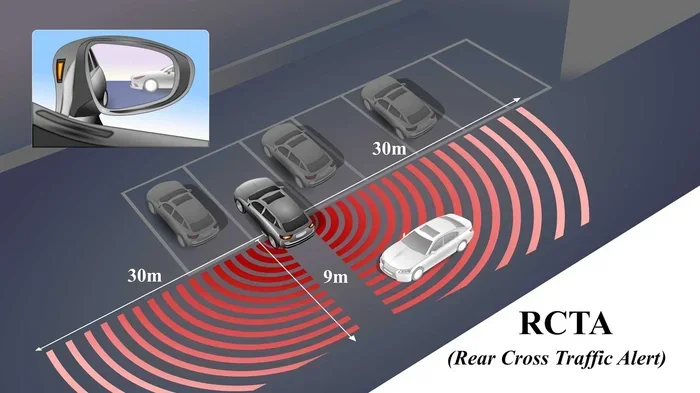
The RCTA setting relies on radar sensors. These sensors are usually mounted on the rear bumper of the car. They scan the area behind and to the sides of your vehicle. When you shift into reverse, the system becomes active.
The Sensor Technology Behind RCTA
The radar sensors send out signals that bounce off objects and return to the car. The system calculates the speed, distance, and direction of approaching vehicles. If a car is moving fast enough toward your path, the RCTA system triggers an alert.
Most systems use a combination of warnings:
- Audible Alerts: A beeping sound that gets faster as the approaching vehicle gets closer.
- Visual Warnings: Messages or icons on the dashboard or infotainment screen.
- Haptic Feedback: Some cars vibrate the steering wheel or seat to grab your attention.
The cross-traffic detection capability is what makes RCTA special. It does not just watch what is directly behind you. It watches the entire area behind and to both sides. This gives you a much wider field of awareness than mirrors alone.
When Does the RCTA Setting Activate?
The RCTA setting typically activates under these conditions:
- You shift the car into reverse gear.
- Your vehicle speed is below a certain threshold, usually around 15 to 20 mph.
- The radar sensors detect a moving object approaching from the sides.
- The approaching vehicle is within a specific distance range, often about 70 to 100 feet behind you.
Some advanced systems also work when you are in forward drive at very low speeds. This is helpful when exiting a narrow driveway or pulling out of a tight alley. The RCTA system adapts to the situation and keeps you informed.
Why the RCTA Setting Matters for Safety
Backing up accidents are more common than most people think. According to safety data, thousands of low-speed collisions happen every year in parking lots. Many of these involve drivers who simply did not see an approaching car. The RCTA setting directly addresses this problem.
Real-World Scenarios Where RCTA Helps
Let us look at a few situations where the RCTA setting can prevent an accident:
- Leaving a Parking Spot: You pull out of a space between two large SUVs. A car is approaching from the left at speed. Without RCTA, you might not see it until it is too late. The alert gives you time to stop.
- Backing Out of a Driveway: Your neighbor is driving past your driveway on the sidewalk side. The rear collision warning system catches their approach and warns you before you start moving.
- Parking Garage Exits: Exiting a parking garage often involves sharp turns and limited visibility. RCTA helps you spot cars coming around corners.
- Busy Shopping Lots: Weekend shopping means crowded parking lots with pedestrians and shoppers crossing behind cars. RCTA adds a layer of protection in these chaotic environments.
The Numbers Behind RCTA Effectiveness
Studies on automotive safety technology show that rear cross-traffic alert systems reduce backup collision rates significantly. Insurance data suggests that cars equipped with RCTA have fewer low-speed rear-end incidents in parking environments. While no system is perfect, the numbers support the value of this feature.
It is important to note that RCTA works best as part of a larger safety setup. When combined with a rearview camera, parking sensors, and blind spot monitoring, the RCTA setting creates a comprehensive safety net around your vehicle.
Common Issues and Limitations of the RCTA Setting
The RCTA setting is a powerful tool, but it is not flawless. Understanding its limitations helps you use it more effectively and safely.
False Alerts
One of the most common complaints about RCTA is false alerts. The system may beep when there is no actual danger. This can happen when:
- Nearby metal structures reflect radar signals.
- Small objects like shopping carts or road signs trigger the sensors.
- Parked cars with certain shapes or reflectivity confuse the system.
- The sensors are dirty or covered in snow, ice, or mud.
False alerts can be annoying, but they are usually a sign that the system is working as designed. The radar is sensitive by purpose. It is better to get a false alert than to miss a real danger. Keeping the rear bumper sensors clean reduces false alerts significantly.
Sensor Obstructions
The RCTA system depends on clear radar sensors. If the rear bumper is covered in snow, ice, dirt, or debris, the sensors may not work properly. Some cars have sensor cleaning warnings on the dashboard. Pay attention to these alerts.
After a car wash or in winter weather, it is a good habit to check that the sensors are clear. A quick wipe of the rear bumper can make a big difference in RCTA system reliability.
System Calibration and Maintenance
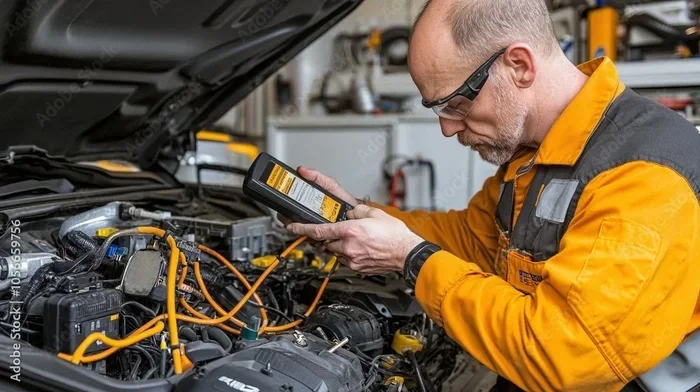
Like any electronic system, RCTA needs proper calibration. After a rear-end collision or bumper repair, the sensors may need recalibration. If you notice that your RCTA setting is not working correctly after any rear-end work, have a certified technician check the system.
Regular maintenance also helps. Keep your car software updated. Many manufacturers release updates that improve cross-traffic detection accuracy and reduce false alerts over time.
When RCTA May Not Activate
There are situations where the RCTA setting may not provide warnings:
- Very slow-moving or stationary objects may not trigger the alert.
- Objects that are too far to the side may be outside the sensor range.
- If the system is turned off manually, it will not activate.
- Extreme weather conditions like heavy rain or thick snow can temporarily reduce sensor performance.
Knowing these limitations helps you stay alert and use the system as a supplement, not a replacement, for your own observations.
How to Get the Most Out of the RCTA Setting
Using the RCTA setting effectively is about more than just turning it on. A few smart habits can make a big difference in your daily driving safety.
Quick Tips for RCTA Users
- Keep Sensors Clean: Wipe the rear bumper sensors regularly, especially in winter or after off-road driving.
- Do Not Rely on RCTA Alone: Always check your mirrors and look over your shoulder before reversing.
- Learn Your Alert Sounds: Know the difference between a standard alert and a urgent warning in your specific car model.
- Combine RCTA with Your Camera: Use the rearview camera and RCTA together for the best rear visibility.
- Stay Calm During Alerts: When the RCTA system beeps, pause and look before continuing to reverse.
- Check Your Owner Manual: Every car is slightly different. Your manual will tell you the exact activation speed and range for your RCTA system.
Customizing RCTA Settings
Many modern cars allow you to customize the RCTA setting. You may be able to adjust the sensitivity of the alerts or turn certain warnings on and off. Some vehicles let you choose between different alert types, such as audio-only or audio plus visual warnings.
If your car offers these options, experiment with them in a safe environment like an empty parking lot. Find the settings that feel comfortable and effective for your driving style. The goal is to have the system help you without causing unnecessary distractions.
RCTA and Other Driver Assistance Systems
The RCTA setting works best when it is part of a broader safety ecosystem. Here are some related features that complement RCTA:
- Adaptive Cruise Control: Maintains safe following distance when driving forward.
- Lane Departure Warning: Alerts you when you drift out of your lane.
- Automatic Emergency Braking: Can apply the brakes if a collision is imminent.
- 360-Degree Camera Systems: Provide a bird’s-eye view of the area around your car.
Together, these systems create a layered approach to vehicle safety. The RCTA setting handles the blind spots behind and to the sides of your car while you reverse. Other systems cover different driving scenarios. Understanding how they all work together gives you the best overall protection.
RCTA Setting Across Different Car Brands
While the core function of RCTA is the same across all vehicles, the implementation can vary by brand and model. Let us look at how some major manufacturers approach this feature.
Toyota and Lexus
Toyota calls its system Rear Cross-Traffic Alert and it comes standard or available on most models. Lexus versions often include additional features like steering assist to help you avoid collisions automatically. The RCTA setting in Toyota vehicles is known for being reliable and easy to use.
Honda
Honda’s RCTA system is part of its Honda Sensing suite. It uses a combination of radar and camera inputs for cross-traffic detection. Honda models often provide clear audio tones and dashboard icons to communicate alerts effectively.
Ford
Ford’s Rear Cross-Traffic Alert is available on most newer models. Some Ford vehicles offer an enhanced version that includes intersection assist, which can apply the brakes if you do not respond to the alert and a collision is imminent.
BMW and Mercedes-Benz
Premium brands like BMW and Mercedes-Benz offer advanced RCTA systems with seamless integration into their broader driver assistance packages. These systems often include features like automatic reversing braking and enhanced sensor range for superior rear visibility and safety.
Should You Turn the RCTA Setting On or Off?
This is a common question among drivers. The short answer is: keep it on. The RCTA setting is designed to be active by default for a reason. It adds a valuable safety layer that works silently in the background until you need it.
There are a few rare situations where you might want to turn it off temporarily. If you are in a very crowded parking lot and the system is giving constant false alerts, a brief shutoff might reduce distraction. But as soon as you are in a clearer area, turn it back on. The RCTA system is there to protect you, and it works best when it is always active.
Some newer cars also have an auto-on feature. This means the RCTA setting turns itself on whenever you shift into reverse. If your car has this feature, you do not need to worry about remembering to activate it manually.
Conclusion
The RCTA setting is one of the most practical and life-saving features in modern vehicles today. It gives you extra awareness when reversing, helps you avoid low-speed collisions, and builds confidence in tight parking situations. Understanding how it works, what its limitations are, and how to use it effectively makes you a smarter, safer driver.
Keep your sensors clean, combine RCTA with your rearview camera, and never treat it as a replacement for your own attention. The Rear Cross-Traffic Alert system is a helper, not a substitute for safe driving habits. Use it wisely, and it will serve you well for years to come.
Take a moment today to review your car’s RCTA setting. Check your owner manual, test the system in a safe area, and make it a regular part of your driving routine. Your future self will thank you for it.
Frequently Asked Questions
Is the RCTA setting the same as blind spot monitoring?
No, they are different. Blind spot monitoring watches the sides of your car while you drive forward. The RCTA setting activates when you are reversing and detects vehicles approaching from behind and to the sides. Both are valuable safety tools, but they serve different purposes.
Can I turn off the RCTA setting on my car?
Yes, most vehicles allow you to turn the RCTA system off. However, it is recommended to keep it on for maximum safety. If you do turn it off, remember to switch it back on when you are done with whatever situation caused you to disable it.
Why does my RCTA system give false alerts?
False alerts can happen when radar sensors detect objects that are not actual traffic dangers, like metal poles, shopping carts, or nearby walls. Dirty sensors, snow, or ice can also cause false alerts. Keeping the rear bumper clean helps reduce these occurrences.
Does the RCTA setting work in all weather conditions?
The RCTA setting works in most weather conditions, but heavy rain, snow, or ice can temporarily affect sensor performance. If your sensors are covered in snow or mud, the system may not activate properly. Always clear sensors before driving in harsh weather.
Can I add RCTA to an older car that does not have it?
Adding RCTA to a car that was not originally equipped with it can be challenging. Some aftermarket solutions exist, but they may not integrate as seamlessly as factory-installed systems. Consult a trusted auto electronics installer to explore your options.
What should I do if my RCTA system stops working?
First, check that the rear bumper sensors are clean and unobstructed. If they are clear and the system still does not work, check your dashboard for warning lights. You may need a diagnostic scan or sensor recalibration. Contact a certified service center for proper diagnosis and repair.