How Do I Clear My Toyota Code And Reset The System
Clearing your Toyota code is simpler than most owners think. You can use an OBD-II scanner, disconnect the battery, or visit a dealership to reset the system. This guide walks you through every method so your Toyota code clears safely and stays off.
Have you ever glanced at your Toyota dashboard and spotted a warning light that made your stomach drop? That little symbol can feel like a mystery, especially when you have no idea what it means or how to make it go away. Whether it is a check engine light, a service indicator, or a warning about your hybrid battery, clearing the code behind it is often the first step toward peace of mind.
So, how do you actually clear a Toyota code and reset the system? The good news is that you do not need to be a mechanic to handle this. With the right tools and a bit of patience, most Toyota owners can clear their codes in minutes. In this guide, we will walk you through every method, explain what each Toyota code means, and share tips to keep your vehicle running smoothly. Let us get started.
Key Takeaways
- Use an OBD-II Scanner: The fastest and most reliable way to clear Toyota diagnostic codes at home.
- Battery Disconnect Method: A simple alternative that works when you don’t have a scanner handy.
- Don’t Ignore Warning Lights: Clearing a code without fixing the root cause will just bring it back.
- Know Your Toyota Model: Different Toyota models may have slightly different reset procedures.
- Drive Cycle Matters: After clearing a code, you may need to complete a drive cycle for the system to recheck.
- Visit a Pro When Needed: Some Toyota codes require professional diagnostic tools and expertise.
📑 Table of Contents
- Understanding Toyota Diagnostic Trouble Codes
- How To Clear Your Toyota Code Using an OBD-II Scanner
- How To Reset the Toyota System by Disconnecting the Battery
- Common Toyota Codes and What They Mean
- When To Clear Your Toyota Service Light
- Mistakes To Avoid When Clearing Toyota Codes
- Can You Clear Toyota Codes Without a Scanner?
- Expert Tips for Keeping Your Toyota Code-Free
- Final Thoughts on Clearing Your Toyota Code
Understanding Toyota Diagnostic Trouble Codes
Before you clear anything, it helps to understand what those codes actually are. Every modern Toyota vehicle uses a system called On-Board Diagnostics II, or OBD-II for short. This system monitors sensors and components throughout your car. When something is off, the system stores a Toyota diagnostic trouble code, or DTC, and lights up a warning on your dashboard.
What Do Toyota Warning Lights Mean?
Toyota dashboards use several different warning lights. The most common ones include:
- Check Engine Light: This is the most universal warning. It can mean anything from a loose gas cap to a serious engine problem.
- Service Required Light: This usually means your car is due for routine maintenance like an oil change or tire rotation.
- Battery Warning Light: This signals a problem with your charging system or hybrid battery.
- Oil Pressure Warning: This means your oil level or pressure is too low and needs immediate attention.
Each light corresponds to one or more Toyota error codes. When you want to clear Toyota error codes, you first need to read them with a scanner. This tells you exactly what triggered the warning. Skipping this step is one of the biggest mistakes people make.
How To Clear Your Toyota Code Using an OBD-II Scanner
An OBD-II scanner is the best tool for clearing Toyota codes. It plugs directly into your vehicle’s diagnostic port and communicates with the car’s computer. This method is fast, accurate, and works for nearly all Toyota models.
Step-by-Step Scanner Method
- Locate the OBD-II Port: In most Toyotas, the port is under the dashboard on the driver’s side. It is usually near the steering column. Check your owner’s manual if you have trouble finding it.
- Plug In the Scanner: Connect the OBD-II scanner to the port. Turn the ignition to the “ON” position without starting the engine.
- Read the Codes: Follow the scanner’s instructions to retrieve the stored codes. Write them down or take a photo for your records.
- Clear the Codes: Select the option to clear or erase the codes on your scanner. The tool will communicate with the Toyota ECU to reset the system.
- Verify the Reset: Turn the ignition off, wait a few seconds, then turn it back on. The warning light should be off if the code cleared successfully.
Using a scanner is the most reliable method. If you do not own one, you can buy a basic Toyota code reader tool for under $30 at most auto parts stores. Some scanners even let you monitor live data from your Toyota’s sensors, which is incredibly helpful for troubleshooting.
How To Reset the Toyota System by Disconnecting the Battery
If you do not have a scanner, you can try the battery disconnect method. This works by cutting power to the Toyota ECU, which resets the system and clears stored codes. However, this method comes with some important caveats.
Steps To Disconnect Your Toyota Battery
- Turn Off the Engine: Make sure your Toyota is completely off and the key is removed from the ignition.
- Open the Hood: Locate the battery. In most Toyotas, it sits in the engine bay on the front left side.
- Disconnect the Negative Terminal: Use a wrench to loosen the negative cable (marked with a minus sign). Pull it off the battery post and tuck it away so it cannot touch the terminal.
- Wait 15 to 30 Minutes: This gives the ECU time to fully reset. Some Toyota models may need less time, but waiting longer will not hurt.
- Reconnect the Battery: Attach the negative cable back to the terminal and tighten it securely. Start the engine and check if the warning light is gone.
Important: Disconnecting the battery can also reset other settings in your Toyota. Your radio presets, clock, and power window calibration may need to be reprogrammed. If you are concerned about this, the scanner method is a better choice.
Some owners also ask, Can I drive my Toyota Camry with the check engine light on? The short answer is yes, in most cases. But driving with the light on for too long can cause more damage. Always address the root cause before clearing the code.
Common Toyota Codes and What They Mean
Not all Toyota codes are created equal. Some are minor and easy to fix, while others point to serious problems. Here are some of the most common Toyota codes you might encounter:
| Code | Meaning | Common Fix |
|---|---|---|
| P0300 | Random/Multiple Cylinder Misfire | Spark plugs, ignition coils, or fuel injectors |
| P0420 | Catalyst System Efficiency Below Threshold | Catalytic converter replacement |
| P0171 | System Too Lean (Bank 1) | Vacuum leak, oxygen sensor, or air filter |
| P0446 | Evaporative Emission Control System Malfunction | Loose gas cap or EVAP purge valve |
| P0A0F | Hybrid Battery Deterioration | Hybrid battery inspection or replacement |
Once you know what the code means, you can decide whether to fix it yourself or seek professional help. For instance, a loose gas cap is a quick DIY fix. But a hybrid battery issue may require a visit to a Toyota dealership.
If you are dealing with a check engine light that keeps coming back after you clear it, the problem is likely not fully resolved. The Toyota ECU monitors your vehicle continuously. If the issue persists, the code will return. This is why it is important to make your check engine light go off for inspection only after the underlying problem is truly fixed.
When To Clear Your Toyota Service Light
The service light on your Toyota is different from the check engine light. It is a maintenance reminder, not a warning about a mechanical problem. You may want to clear this light after completing routine service like an oil change or tire rotation.
How To Reset the Toyota Service Indicator
Resetting the service light varies by Toyota model. Here are the general steps that work for most Toyota vehicles:
- Turn the Ignition to ON: Do not start the engine. Just turn the key or press the start button.
- Press the Trip Button: Locate the trip meter reset button on your dashboard or steering wheel. Hold it down.
- Navigate to Service Reset: Use the trip button to scroll through the menu until you find the service reset option.
- Confirm the Reset: Press and hold the trip button again to confirm. The service light should turn off.
For detailed instructions specific to your Toyota model, you can always refer to the owner’s manual. If the service light persists, you may want to clear your Toyota service light using a scanner, as some models require a tool to fully reset the indicator.
Mistakes To Avoid When Clearing Toyota Codes
Clearing a Toyota code sounds simple, but people make mistakes all the time. Here are the most common ones to watch out for:
- Clearing Codes Without Diagnosing First: This is the number one mistake. You should always read and understand the code before erasing it. Otherwise, you are just masking a real problem.
- Ignoring the Root Cause: If you clear a code and the problem is still there, the light will come right back. Fix the issue first, then clear the code.
- Using a Cheap or Incompatible Scanner: Not all scanners work well with Toyota vehicles. Invest in a quality Toyota OBD-II scanner that supports your model year.
- Disconnecting the Battery Without Preparation: As mentioned earlier, this can wipe out your radio presets, clock settings, and other personalized features.
- Driving Without Completing a Drive Cycle: After clearing a code, your Toyota may need a full drive cycle to recheck all systems. Skipping this can leave the code lingering.
Another thing to keep in mind: some Toyota warning lights, like the traction control light, can be affected by weather or road conditions. Before clearing any code, make sure it is not a false alarm triggered by rain, snow, or a bumpy road.
Can You Clear Toyota Codes Without a Scanner?
Yes, you can clear some Toyota codes without a scanner, but it depends on the type of code. The battery disconnect method works for many diagnostic codes. However, for more complex issues, a scanner is really the only reliable option.
Some Toyota owners also wonder about using smartphone apps or wireless Bluetooth scanners. These work well with compatible devices. Just make sure the app or scanner supports Toyota-specific protocols. The Toyota code reader tool market has grown a lot in recent years, giving owners more affordable options than ever before.
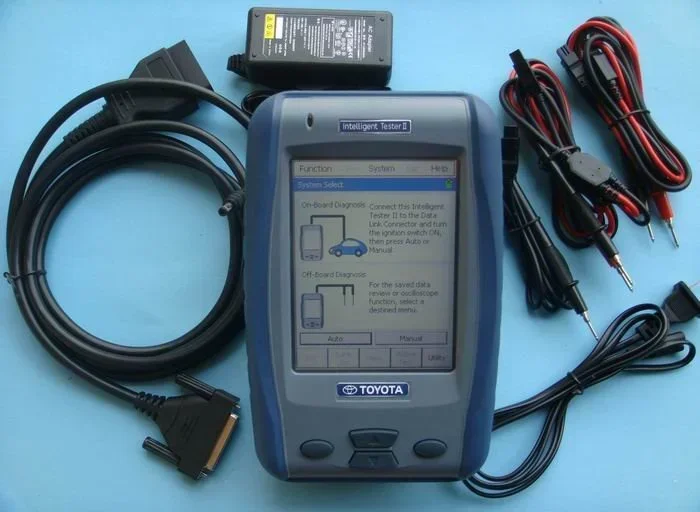
It is also worth noting that you can visit any Toyota dealership to have codes cleared professionally. They have access to Toyota-specific diagnostic software that can read and reset codes more thoroughly than generic scanners. This is especially helpful for Toyota hybrid battery health issues or complex electrical problems.
Expert Tips for Keeping Your Toyota Code-Free
Once you have cleared your Toyota codes, you want to keep them from coming back. Here are some expert-backed tips to help:
- Check Your Gas Cap Regularly: A loose or worn gas cap is the most common cause of check engine lights. Make sure it clicks tightly every time you fill up.
- Stay on Top of Routine Maintenance: Regular oil changes, tire rotations, and fluid checks prevent many issues that trigger Toyota codes.
- Use the Right Fuel: Always use the fuel grade recommended in your Toyota owner’s manual. Using the wrong octane can trigger error codes.
- Monitor Your Dashboard: Do not ignore warning lights, even if they seem minor. A small issue today can become a big repair bill tomorrow.
- Keep a Scanner on Hand: Having your own OBD-II scanner at home saves time and money. You can check codes anytime, even before a long road trip.
If you have ever wondered is my car overheating, that is a different issue entirely. Overheating can trigger its own set of Toyota codes, and it requires immediate attention. Never ignore an overheating warning, as it can cause serious engine damage if left unchecked.
Final Thoughts on Clearing Your Toyota Code
Clearing your Toyota code and resetting the system does not have to be stressful. Whether you use an OBD-II scanner, disconnect the battery, or visit a dealership, the key is to understand what the code means first. Always fix the underlying problem before clearing the code. This way, you avoid the frustrating cycle of a light that keeps coming back.
Take a few minutes to familiarize yourself with your Toyota’s dashboard symbols and diagnostic system. The more you know about your vehicle, the more confident you will feel handling minor issues on your own. And remember, some codes are perfectly normal and temporary, while others demand immediate action. Trust your instincts, and when in doubt, consult a professional.
Your Toyota is a complex machine, but keeping it in great shape is well within your reach. With the right knowledge and a few basic tools, you can clear codes, reset your system, and get back on the road with confidence.
Frequently Asked Questions
Can I clear my Toyota code without a scanner?
Yes, you can disconnect your Toyota battery for 15 to 30 minutes to reset the ECU and clear some codes. However, this method works best for minor issues and may reset other vehicle settings like your clock and radio presets.
Why did my Toyota check engine light come back after I cleared the code?
The underlying problem was not fixed. Toyota’s ECU continuously monitors your vehicle. If the issue that triggered the code still exists, the system will store the code again and light up the warning.
Is it safe to drive my Toyota with the check engine light on?
In most cases, it is safe for a short distance. However, if the light is flashing, you should stop driving immediately and seek help. A flashing light usually indicates a serious problem like engine misfire that can damage your catalytic converter.
How much does it cost to clear a Toyota code at a dealership?
Many Toyota dealerships will read and clear codes for free as part of a routine check. If the issue requires repair, costs vary depending on the problem. Simple fixes like a loose gas cap cost nothing, while more complex repairs can range from $100 to several hundred dollars.
Will clearing my Toyota code affect my warranty?
No, clearing a code does not void your Toyota warranty. However, if a dealer finds evidence that you cleared codes to hide a known problem, it could affect a warranty claim. Always be honest about your vehicle’s history.
What is the difference between a Toyota DTC code and a service reminder?
A DTC code is a diagnostic trouble code that indicates a mechanical or electrical problem. A service reminder is simply a maintenance alert telling you it is time for routine service like an oil change or inspection.