How Do You Reset the Oil Change Light After an Oil Change
Resetting your oil change light after an oil change is a quick and easy process that keeps your car running smoothly. Most vehicles let you reset the oil life indicator in just a few minutes using the dashboard controls or steering wheel buttons. Knowing the oil change reset procedure saves you time and money, and it helps you stay on top of your vehicle maintenance schedule.
Key Takeaways
- Resetting the oil change light is essential: It ensures your maintenance reminder stays accurate after every oil change.
- The process varies by vehicle: Different car brands use different button combinations and menu paths.
- Most resets take under 5 minutes: You can do it yourself at home without any special tools.
- Ignoring the reset leads to confusion: A stuck warning light can cause unnecessary worry and miscommunication with mechanics.
- Check your owner manual first: It provides the exact reset steps for your specific make and model.
- Oil life percentage matters: Many modern cars use a percentage-based system instead of a simple light.
- Regular oil changes extend engine life: Staying current with your service interval protects your engine long-term.
📑 Table of Contents
- How Do You Reset the Oil Change Light After an Oil Change?
- Why Resetting the Oil Change Light Matters
- How the Oil Life System Works
- How to Reset the Oil Change Light by Vehicle Brand
- Common Problems When Resetting the Oil Change Light
- How Often Should You Change Your Oil?
- When to Seek Professional Help
- Quick Tips for a Smooth Oil Change Reset
- Final Thoughts on Resetting Your Oil Change Light
How Do You Reset the Oil Change Light After an Oil Change?
Changing your oil is one of the most important maintenance tasks you can do for your car. But once the fresh oil is in and the old filter is replaced, there is one more step many people forget. You need to reset the oil change light.
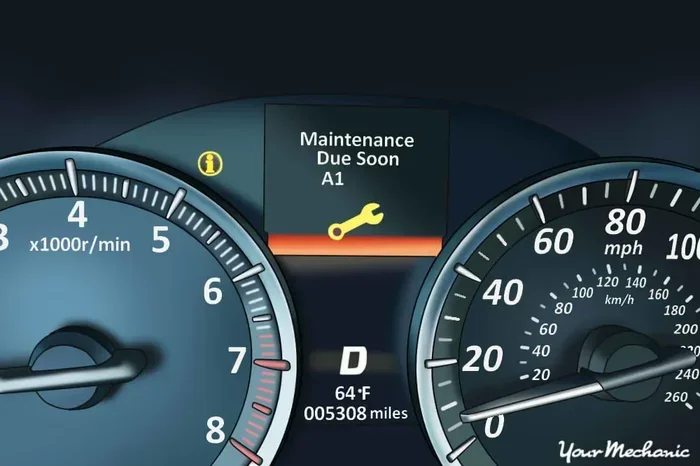
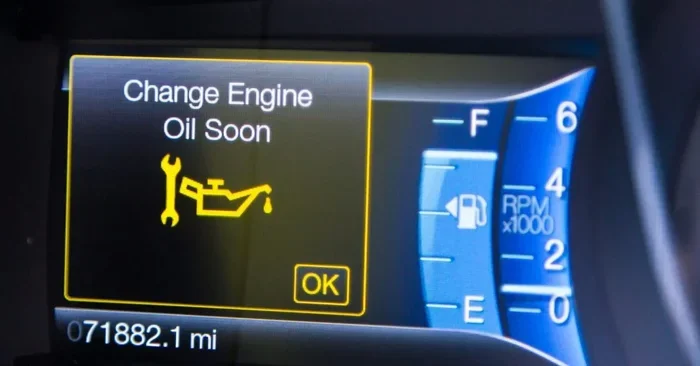
The oil change light is your vehicle’s way of reminding you that it is time for an oil change. After you complete the service, that light should turn off. If it does not, the oil life indicator keeps flashing on your dashboard. This can be confusing and annoying. More importantly, it means your maintenance reminder is no longer accurate.
Resetting the light is not just about clearing a warning. It is about keeping your vehicle maintenance schedule on track. Modern cars use sophisticated oil life systems that monitor driving habits, engine temperature, and mileage. These systems calculate when your next oil change is due. When you reset the light, you tell the system that fresh oil is now in the engine. This starts the countdown all over again.
The good news is that resetting the oil change light is almost always a simple process. You do not need a mechanic or expensive tools. Most car owners can do it themselves in just a few minutes. Whether you drive a Toyota, Honda, Ford, Chevrolet, or another brand, the steps are straightforward once you know where to look.
In this guide, we walk you through the entire oil change reset procedure step by step. We cover the most common vehicle brands and explain what to do if the light will not turn off. By the end, you will feel confident handling this task on your own.
Why Resetting the Oil Change Light Matters
Some people wonder if resetting the oil change light really matters. After all, the oil is already changed. What is the big deal? The truth is that this small step has a bigger impact than most drivers realize.
It Keeps Your Maintenance Schedule Accurate
Your car’s oil life system tracks how much life is left in your current oil. When you reset it after an oil change, you are telling the computer that the oil is fresh. This means the system can accurately predict when the next oil change is due. If you skip the reset, the light may come on too early or too late. Either way, it throws off your maintenance schedule.
It Prevents Unnecessary Trips to the Mechanic
A persistent oil change light can cause panic. You might think something is wrong with your engine. You might book an expensive appointment with a mechanic only to find out it was just a reset issue. By learning how to reset the light yourself, you avoid these unnecessary trips and the costs that come with them.
It Protects Your Engine Long-Term
Staying on top of your oil change schedule is one of the best things you can do for your engine. Fresh oil lubricates moving parts, reduces friction, and prevents overheating. When your maintenance reminder works properly, it keeps you from missing oil changes. This leads to better engine performance and a longer vehicle lifespan.
How the Oil Life System Works
Before you reset the light, it helps to understand how the system works. Most modern vehicles use an oil life monitoring system instead of a simple mileage-based reminder. This system uses sensors and algorithms to determine when oil needs changing.
What the Oil Life Percentage Means
Many newer cars display an oil life percentage on the dashboard instead of a warning light. This percentage starts at 100% after an oil change and decreases over time. When it drops to around 15%, the system prompts you to get an oil change. Once you service the vehicle, you reset the percentage back to 100%. This gives you a clear, visual indicator of where you stand with your next oil change.
How the System Calculates Oil Life
The oil life system does not just count miles. It considers several factors:
- Driving conditions: Stop-and-go traffic is harder on oil than highway driving.
- Engine temperature: Extreme heat or cold affects oil degradation.
- Idling time: Extended idling can contaminate oil faster.
- Load and stress: Towing or carrying heavy loads puts more strain on the oil.
- Mileage: Miles driven still plays a role in the calculation.
Because the system accounts for real-world driving conditions, it is often more accurate than a simple mileage-based reminder. But it can only work properly if you reset it after each oil change.
How to Reset the Oil Change Light by Vehicle Brand
The reset process varies depending on your vehicle’s make and model. Below, we cover the most common brands and their specific steps. Always refer to your vehicle owner manual for the exact procedure for your car.
Toyota Oil Change Light Reset
Toyota vehicles use a straightforward reset process for the maintenance required light. Here is how to do it:
- Turn the ignition to the ON position. Do not start the engine.
- Press the odometer or trip meter button until you see the maintenance light displayed.
- Turn the ignition to the OFF position.
- Hold the odometer or trip meter button and turn the ignition back to the ON position.
- Continue holding the button until the light turns off and the odometer shows a maintenance interval.
- Start the engine and verify the light is off.
If you are wondering do you have to reset oil life, the answer is yes for Toyota models with the maintenance required light. This step ensures the system recognizes the new oil and recalculates the next service interval.
Honda Oil Change Light Reset
Honda vehicles have a slightly different reset process:
- Turn the ignition to the ON position (position I or II).
- Press and hold the select/reset knob on the instrument cluster.
- Wait for the maintenance reminder to appear on the display.
- Continue holding the knob until the light blinks and then resets.
- Turn the ignition off and then back on to confirm the reset.
Ford Oil Change Light Reset
Ford trucks and SUVs use the information display to reset the oil change reminder:
- Use the steering wheel arrows to navigate to the Vehicle Information menu.
- Select the Maintenance menu.
- Find the oil change option and press OK.
- Select the reset option and confirm.
- The message should now display that the oil change is complete.
Chevrolet and GM Vehicles Oil Change Light Reset
For Chevrolet and other GM vehicles, the process typically involves:
- Press the trip odometer button until the oil life system displays.
- Hold the button for several seconds until the display flashes.
- Release the button and wait for the reset to complete.
- Turn the ignition off and back on to verify the reset.
Quick Reset Tips for Any Vehicle
No matter what car you drive, these tips can help:
- Always reset after every oil change: Do not skip this step, even if the light is already off.
- Check your owner manual first: It has the exact steps for your specific model.
- Use the trip meter as a backup: If the light reset does not work, manually tracking your next oil change date in the trip meter helps.
- Do not reset before the oil change: Only reset after fresh oil and a new filter are installed.
Common Problems When Resetting the Oil Change Light
Sometimes the reset process does not go smoothly. Here are the most common issues drivers face and how to fix them.
The Light Will Not Turn Off
If the maintenance required light stays on after you follow the reset steps, do not panic. Try these troubleshooting tips:
- Make sure you are following the exact steps for your vehicle model.
- Try turning the ignition off, waiting 30 seconds, and starting the process again.
- Check if the oil level is correct. Low oil can sometimes trigger a persistent warning.
- If you recently had an oil change at a shop, the technician may have missed the reset.
The Oil Life Percentage Will Not Reset
On vehicles with a percentage-based system, the oil life reading may stay stuck. This usually happens when:
- The reset procedure was not completed fully.
- The vehicle’s battery was recently disconnected.
- There is a electrical or sensor issue that needs professional diagnosis.
In most cases, repeating the reset steps carefully solves the problem. If the percentage will not budge, it may be time to visit a mechanic or dealership for a diagnostic check.
Can You Drive After Resetting the Oil Change Light?
Yes, you can drive normally after resetting the light. In fact, if you are wondering can I drive my car immediately after putting oil in, the answer is yes. Once the oil is at the proper level and the light is reset, your vehicle is ready to go. Just make sure the oil level is correct before driving.
How Often Should You Change Your Oil?
The oil change interval depends on several factors, including your vehicle type, driving habits, and the kind of oil you use. Here is a general guide:
| Oil Type | Typical Interval | Best For |
|---|---|---|
| Conventional Oil | Every 3,000 to 5,000 miles | Older vehicles and high-mileage cars |
| Synthetic Blend | Every 5,000 to 7,500 miles | Moderate driving conditions |
| Full Synthetic Oil | Every 7,500 to 10,000 miles | Newer vehicles and extreme driving |
| High-Mileage Synthetic | Every 5,000 to 7,500 miles | Vehicles with over 75,000 miles |
Always check your vehicle owner manual for the manufacturer’s recommended interval. Some newer cars can go 10,000 miles or more between oil changes when using full synthetic oil. If you are unsure, ask yourself can you go 2 years without changing oil — the answer depends on your vehicle and oil type, but most experts recommend changing oil at least once a year.
Does the Oil Filter Need Changing Every Time?
Yes, you should replace the oil filter with every oil change. The filter traps contaminants and debris that accumulate in the oil. A clogged filter reduces oil flow and can damage your engine. If you are curious, do I need a new filter with every oil change — the short answer is always yes.
When to Seek Professional Help
Most oil change light resets are simple and can be done at home. However, there are times when professional help is the right call.
If you have tried the reset steps multiple times and the light will not go off, there may be an underlying issue. The oil pressure sensor could be malfunctioning. The engine management system might need a diagnostic scan. In these cases, a professional mechanic or dealership can run the right tests and fix the problem.
Also, if you are uncomfortable working under the hood or unsure about your oil level, it is perfectly fine to let a professional handle the oil change and reset. Many quick-lube shops and dealerships will reset the light as part of their service at no extra charge.
If you are dealing with a persistent warning light that seems unrelated to oil, you might want to learn more about clearing the engine management light or turning off the service engine light. These topics cover related dashboard warning systems that sometimes confuse drivers.
Quick Tips for a Smooth Oil Change Reset
- Reset immediately after the oil change: Do it before you drive the car away from the shop or your driveway.
- Keep your owner manual handy: Store it in the glove box for easy reference.
- Note the date and mileage: Write down when you changed the oil so you know when the next one is due.
- Check oil level regularly: Between changes, use the dipstick to make sure the oil is at the proper level.
- Do not ignore warning lights: If a light comes on and you are unsure what it means, address it promptly.
- Use the right oil for your vehicle: Check your manual for the recommended oil weight and type.
- Consider synthetic oil: It lasts longer and provides better engine protection in most cases.
Final Thoughts on Resetting Your Oil Change Light
Resetting the oil change light after an oil change is one of those small tasks that makes a big difference. It keeps your maintenance schedule accurate, prevents unnecessary trips to the mechanic, and gives you peace of mind. The entire process takes just a few minutes, and once you learn it for your specific vehicle, it becomes second nature.
Whether you drive a Toyota, Honda, Ford, or any other brand, the reset process is designed to be simple and user-friendly. Take a few minutes to look up the steps for your car and save them in your phone. That way, every time you get an oil change, you know exactly what to do.
Remember that the oil life system is there to help you take care of your engine. When it works properly, it takes the guesswork out of maintenance. All you have to do is reset it after each oil change and follow the recommended service interval.
Taking care of your car does not have to be complicated. With the right knowledge and a little practice, you can handle the oil change reset like a pro. Your engine will thank you, and your wallet will too.
Frequently Asked Questions
Can I drive my car if the oil change light is on?
Yes, you can drive short distances with the oil change light on, but you should not ignore it for long. The light means your oil life is low and it is time for a change. Driving too long without an oil change can lead to engine wear and potential damage. If the light is flashing or accompanied by other warnings, pull over safely and check your oil level.
What happens if I never reset the oil change light?
If you never reset the light, it will stay on indefinitely. This can be distracting and annoying while driving. More importantly, it means your maintenance reminder is not tracking accurately. You may miss future oil changes or get confused about when your last service was. Always reset the light after each oil change to keep your schedule on track.
How do I know if my oil life system is working correctly?
A working oil life system will display a percentage or mileage countdown after each reset. If the percentage drops steadily as you drive and resets properly after an oil change, the system is functioning correctly. If the percentage stays stuck, resets randomly, or the light comes on too early, there may be a sensor or system issue that needs professional attention.
Can I reset the oil change light without changing the oil?
Technically, yes, you can reset the light without changing the oil. However, this is not recommended. Resetting the light tricks the system into thinking fresh oil has been added. This means your next oil change reminder will be based on incorrect information. Always change the oil before resetting the light to keep your engine properly maintained.
Why does my oil change light come back after I reset it?
If the light comes back shortly after resetting, there are a few possible causes. The oil level may be too low, the oil quality may be poor, or the oil life system may have a malfunction. Check your oil level first using the dipstick. If the oil is at the proper level and the light returns, have a mechanic inspect the oil pressure sensor and engine management system.
Do all cars have a reset button for the oil change light?
Most modern cars have a reset function, but the method varies by brand and model. Some use a physical button on the dashboard or steering wheel. Others require you to navigate through the information display menu. Older vehicles may not have an electronic oil life system at all and instead rely on a simple mileage-based reminder. Always check your vehicle owner manual for the specific reset procedure.
=== CONCLUSION ===
Resetting the oil change light after an oil change is a simple but essential part of vehicle maintenance. It takes just a few minutes and keeps your maintenance schedule accurate. Whether you drive a Toyota, Honda, Ford, or any other brand, the process is straightforward once you know the steps.
Remember to always reset the light after every oil change, use the right oil for your vehicle, and check your owner manual for model-specific instructions. Staying on top of your oil change schedule protects your engine and saves you money in the long run.
Now that you know how to reset the oil change light, you can handle this task confidently the next time you service your vehicle. Keep this guide bookmarked for future reference, and share it with a friend who might need a quick reminder. Happy driving!